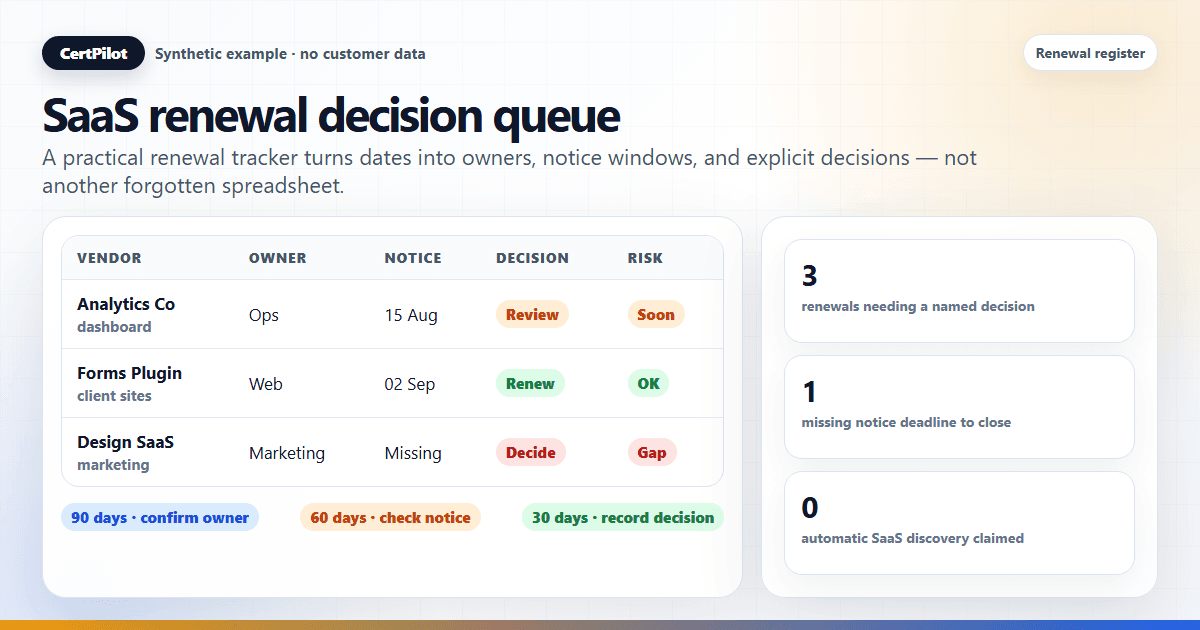
A SaaS renewal tracker template is a structured record of the tools, subscriptions, owners, renewal dates, notice deadlines, auto-renewal settings, and decisions your team must review before a renewal becomes urgent. At minimum, it should tell you what the tool is, who owns the business and technical decisions, when notice must be given, when it renews, and what action is needed next.
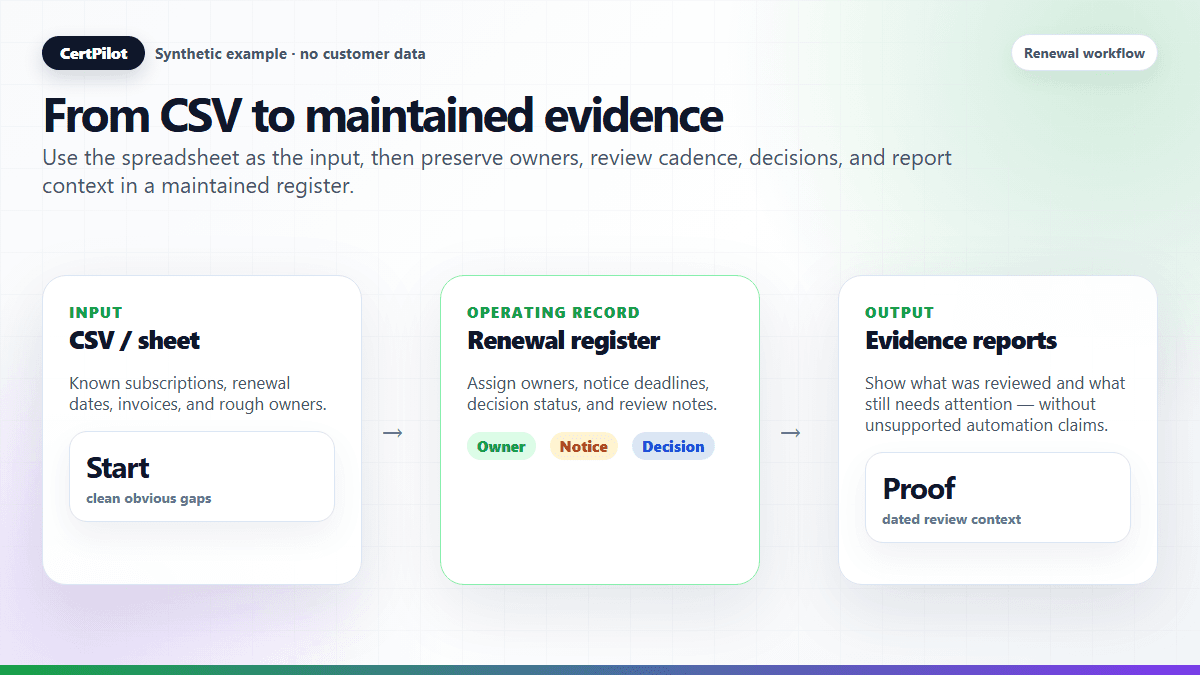
For small teams, a spreadsheet can work at first. The problem is not the spreadsheet itself. The problem is that renewal tracking becomes harder when ownership changes, alerts are needed, client grouping matters, and renewals are connected to domains, hosting, SSL, plugins, or management reporting. The template should therefore behave less like a date list and more like a decision queue.
This guide gives you a practical, import-compatible CSV template and explains when a spreadsheet is enough, when it starts to break, and how CertPilot's Renewals & Vendor Register fits into a calm operational workflow. For the wider operating model, use the renewal tracking hub. For product boundaries and public-check sources, review the CertPilot methodology.
In short
- Download the free CSV and open it in Google Sheets or Excel.
- Track the vendor, subscription, owner, renewal date, notice deadline, auto-renewal state, decision status, and review date first.
- Add cost, billing, purchaser, technical-owner, and client context only when the team can maintain it.
- Review against the verified notice deadline first. Use 90-60-30 renewal reminder rules only as secondary planning checkpoints or when no notice requirement applies; they must never postpone an earlier contractual deadline. Use a 12-month renewal calendar for the wider planning view.
- Move from a spreadsheet to a maintained register when alerts, ownership, decisions, and evidence reports matter.
- CertPilot does not discover SaaS tools automatically or analyze usage; its register is maintained manually or by CSV import.
Download the SaaS renewal tracker CSV
Download the free renewal tracker CSV template. It uses the same headers as CertPilot's live renewal import template, so you can open it in Google Sheets or Excel, remove the example rows, and later import the maintained file into the Renewals & Vendor Register.
The download mirrors the current public import template. You do not need to complete every optional column before starting. Begin with provider, subscription name, asset type, responsible contact, renewal date, notice deadline, auto-renewal state, and decision status; add cost, billing, seat, purchaser, and technical-owner context when it is useful.
For the working spreadsheet, follow the Google Sheets import and notice-first queue setup. The CSV has 30 data columns, A:AD: renewal date is J, notice deadline Y, and decision status Z. Keep spreadsheet helper columns outside that range and export only the original data columns, not formulas or queue labels.
SaaS Renewal Tracking Template Fields
The best template is not the biggest one. It is the one your team will actually maintain. Start with fields that answer operational questions:
- Provider / vendor: identifies who bills or supplies the tool. Example: Example SaaS Co.
- Asset / subscription name: distinguishes multiple subscriptions from one vendor. Example: Marketing workspace.
- Contact / responsible person: names the operational contact. Example: Ops lead.
- Technical owner: names the person who understands the service. Example: IT lead.
- Purchased by: records who initiated the purchase. Example: Finance lead.
- Renewal date: when the current term renews or expires, not necessarily the last opportunity to act. Example: 2026-12-31.
- Notice deadline: the verified deadline for submitting cancellation or non-renewal notice under the contract. Example: 2026-09-25, well before a December renewal.
- Auto-renews: prevents an automatic charge from being mistaken for a decision. Example: true.
- Decision status: records renew, cancel, review, or undecided. Example: review.
- Last reviewed: records the date someone says they checked the record; a manually entered timestamp is not proof that notice was delivered. Keep the decision and receipt evidence separately. Example: 2026-09-22.
- Billing cycle: explains cadence. Example: monthly or annual.
- Cost / currency: supports budget review when safe to show. Example: EUR 120.
- Invoice to / invoice email: shows who receives or approves the invoice. Example: finance@example.com.
- Client/customer: useful for agencies and MSPs. Example: Client Alpha.
- Used for: explains business dependency. Example: Reporting dashboard.
- Spreadsheet review status: a helper flag for notice overdue, notice due, missing information, or a closed action. This is not an extra column in the downloadable CSV.
- Notes: keeps practical context. Example: Renew after client approval.
If your team manages client work, populate the existing client_name field in S early. Retrofitting client grouping later is painful because the same vendor may appear across many clients.
A notice date is not a guaranteed "last safe date." Check the permitted delivery method, whether notice must be received rather than sent, the applicable timezone, business-day rules, and vendor-specific terms. Allow time for internal approval and delivery. This tracker is an operational aid, not legal advice; ask the contract owner or a qualified adviser when the terms are unclear. Do not invent a notice date or treat a blank as proof that no notice is required.
Related reading: Agency Renewal Tracking Spreadsheet. If the existing list is messy, clean it with the SaaS renewal CSV import template before treating the tracker as reliable.
Why SaaS Renewal Tracking Fails
Most renewal systems fail for boring reasons. The tool was purchased by one person, used by another, billed to a third, and approved by no one specific. When renewal time arrives, the team has to reconstruct the chain from old emails, calendar reminders, browser bookmarks, and memory.
The common failure points are:
- The owner left the company.
- The invoice goes to an old email address.
- The tool renews annually and nobody remembers the date.
- The subscription supports a client project, but the client is not recorded.
- Cost is visible in one spreadsheet but hidden from people who need the operational record.
- The renewal is tied to hosting, DNS, a domain, a plugin license, or an email service.
A SaaS renewal tracking template should reduce those questions before they become emergencies.
Spreadsheet vs Maintained Register
Spreadsheets are useful when the list is small, the team is stable, and someone reviews the file regularly. They are also easy to share and adapt.
But spreadsheets become fragile when you need alerts, client-ready reporting, and a history of what was reviewed. A spreadsheet can store dates, but it does not naturally turn those dates into a monthly proof report for a client or manager.
CertPilot's Renewals & Vendor Register is designed for that middle ground. It is not enterprise SaaS management. It does not discover vendors automatically, read invoices, connect to bank feeds, optimize licenses, or cancel subscriptions. It gives teams a structured, manual or CSV-based way to track assets with renewal dates, notice deadlines, ownership, and decision context so those records can feed alerts and evidence reports.
Use a spreadsheet if you only need a static list. Use a maintained register when the list needs ownership, decisions, reporting, and domain/SSL/DNS context.
If the debate has moved beyond the spreadsheet into tool categories, compare a SaaS management platform, renewal register, and CMDB before buying a broader system than the renewal workflow needs.
Turn the tracker into a decision queue
The long-tail problem behind most SaaS renewal searches is not "how do I make a list?" It is "how do I know what needs a decision next?" A good renewal tracker therefore needs one view that behaves like a queue. When you open the tracker, the next action should be obvious without reading every note.
If the tracker is being handed to a new IT admin, use the software subscription handover checklist to check ownership, admin-access responsibilities, notice deadlines, and decision notes. Keep the CSV's existing field layout intact; do not store credentials in the tracker.
Use these queue fields first:
- Notice deadline: by when must the contract's notice requirements be met? Surface overdue, imminent, and unknown notice dates before sorting by renewal date.
- Decision status: use the CSV values
undecided,review,renew, orcancel. Record a downgrade or other change in decision notes rather than inventing another import value. A decision is not evidence that its follow-up action is complete. - Responsible owner: who must make or chase the decision? Use a named person, not "IT".
- Business purpose: why does the subscription exist? One sentence is enough.
- Dependency: what breaks if the tool is removed? Link it to a client, team, domain, website, or workflow.
- Review note: what was decided this cycle? Date the note if the tracker does not store history.
That queue view keeps the template practical. A finance-only tracker may know the cost and invoice date but still miss the operational decision. An IT-only list may know who uses the tool but miss the cancellation window. The renewal decision queue sits between them: enough context to decide, without pretending to be procurement software.
A Practical SaaS Renewal Workflow
The template matters less than the review habit around it. A simple workflow is enough:
- Add every recurring software tool as an asset.
- Assign an owner or contact person.
- Record the renewal date, billing cycle, and verified notice deadline. Investigate missing terms immediately; where no notice is required, document that finding and its source.
- Schedule the decision review before the notice deadline, allowing for approval, delivery, and any receipt requirement. Keep cost visibility separate from timing risk.
- Open the notice-first queue regularly: overdue notices first, then imminent notices, missing dates or owners, and unresolved decisions. Do not wait for a renewal-relative reminder.
- Record
reneworcancel, carry out the required action, and retain confirmation in the decision notes or the team's evidence location. Only then mark the spreadsheet-only action-complete helper. - Include the reviewed state in an operations or client report. For the next renewal cycle, update the dates, reopen the decision, and clear the old action-complete helper.
This workflow does not require a complex procurement system. It requires a clean record and a review rhythm.
Put notice deadlines ahead of the 30 / 60 / 90 day cadence
Check notice terms when adding the record, not at a later 60-day reminder. Work backwards from the verified notice deadline to allow time for evaluation, approval, and the required notice delivery. A 30-day notice-warning flag is a working view, not a promise that 30 days is enough for every contract or replacement.
For example, on 2026-09-22, a synthetic subscription renewing on 2026-12-31 has a verified notice deadline of 2026-09-25. Renewal is 100 days away, but notice is due in three days. Act now: even the normal 90-day renewal checkpoint would be too late for that notice deadline.
The 90/60/30 renewal checkpoints can still support budget planning, ownership checks, and implementation follow-up. Use them as the primary timing anchor only when the contract has no notice requirement and that has been confirmed. If an earlier notice or internal approval deadline exists, it always takes precedence. An overdue notice flag means escalate and verify the remaining options, not assume cancellation is still possible.
For agencies and MSPs, allow for client approval before the notice deadline too: is this subscription used for one client, many clients, or internal operations? The answer changes who approves renewal and whether the record belongs in a client-facing proof routine.
Template for Small Teams
For a small internal team, start with this minimum version:
- Working minimum: vendor, subscription name, responsible contact, renewal date, billing cycle, and decision status. These are review-workflow recommendations, not a separate importer schema.
- Notice check: record the verified notice deadline or explicitly confirm that no notice is required. An unknown deadline remains review work, not an optional detail to ignore.
- Additional context: auto-renewal state and what the tool is used for.
- Optional: cost and notes, especially when cost is sensitive or approval context belongs somewhere else.
This is enough to start. Populate the existing invoice and client fields once the team starts asking who pays, who approves, or which client depends on the subscription.
Template for Agencies and MSPs
Agencies and MSPs need more structure because every renewal may affect a client relationship.
Complete these existing CSV fields within A:AD:
- S —
client_name - F —
billing_entity - H —
invoice_email - M —
hide_cost
Optional extra context includes the client owner or account manager, domain/website dependency, and whether the item belongs in a client report. Store it in T — notes if it should survive A:AD export, or in sheet-only columns after the queue helpers if it is only needed in the working spreadsheet. Sheet-only columns are excluded from that export; do not insert them into A:AD.
For example, a form plugin license may not look important in a finance spreadsheet. In a care plan context, it matters because it may affect client forms, ecommerce checkout, lead capture, or security updates.
Related reading: Client Asset Register for Web Agencies
Risk Statuses to Use
Keep statuses simple:
- Notice overdue / due: a notice date has passed or falls within the selected review window, regardless of how far away renewal is.
- Missing or invalid information: investigate missing notice terms, dates, owners, or decisions. A blank does not mean safe.
- Renewal overdue / due: a secondary timing signal; use renewal as the primary anchor only where no notice is required.
- Action pending / unresolved decision: continue follow-up even after choosing
reneworcanceluntil the action is completed. - Closed: keep for reference after the action is confirmed complete. Reset the helper when starting the next cycle.
Keep these review labels in helper columns, not in decision_status. The renewal-risk formula guide supplies the column-aligned checks and queue logic; it does not change CertPilot's stored status behavior.
What Not to Track
Avoid storing sensitive data that does not belong in a renewal tracker:
- Full card numbers.
- Passwords.
- Recovery codes.
- Private API secrets.
- Personal login credentials.
Use safe labels instead, such as "Company Visa ending 1234" or "Bank transfer." A renewal tracker should tell the team where the renewal lives, not become a secrets vault.
How CertPilot Fits
CertPilot combines public-signal checks with Renewals & Vendor Register records and management-ready reporting. That means a team can track domains, SSL and DNS context alongside hosting, SaaS subscriptions, plugin licenses, contracts, and other renewal assets in one operational workflow.
The value is not automatic vendor discovery. The value is that maintained records feed renewal alerts, the Renewal Risk Report, Monthly Proof, and the on-demand Weekly Governance report. For lean IT teams, that turns scattered renewal data into evidence management can review; agencies and MSPs can use the same records in client-facing routines.
For teams moving from a spreadsheet to a maintained product record, the SaaS renewal register page explains the fields and reports CertPilot supports today.
Explore the live Renewals & Vendor Register, or view the sample evidence reports to see how maintained renewal records become management-ready output.
If renewal work also includes public domain, SSL, and DNS context, the free 10-domain audit provides a separate one-time check. It does not discover SaaS subscriptions or populate the register automatically.
Frequently Asked Questions
What should a SaaS renewal tracking template include?
It should include vendor, subscription name, responsible contact, renewal date, notice deadline, auto-renewal state, decision status, last-reviewed date, cost if visible, client or department, and notes. Technical owner and purchaser fields add useful decision context.
Is a spreadsheet enough for SaaS renewal tracking?
A spreadsheet can be enough for a small, stable list. It becomes weaker when you need alerts, client grouping, ownership reminders, renewal-risk reporting, or domain and hosting context.
Should I review the renewal date or notice deadline first?
Use the verified notice deadline first and allow time for approval and the required delivery or receipt. The renewal date is when the term renews or expires; it may be much later. A 90/60/30 reminder must not override earlier notice terms. If no notice is required, document that fact before relying on renewal-only timing.
Does CertPilot discover SaaS tools automatically?
No. CertPilot's Renewals & Vendor Register is a structured manual and CSV-based record for assets with renewal dates. It does not perform automatic vendor discovery or usage analytics.
Should hidden costs be included in shared reports?
No. If costs are sensitive, they should be hidden from shared views and excluded from client-facing cost summaries.