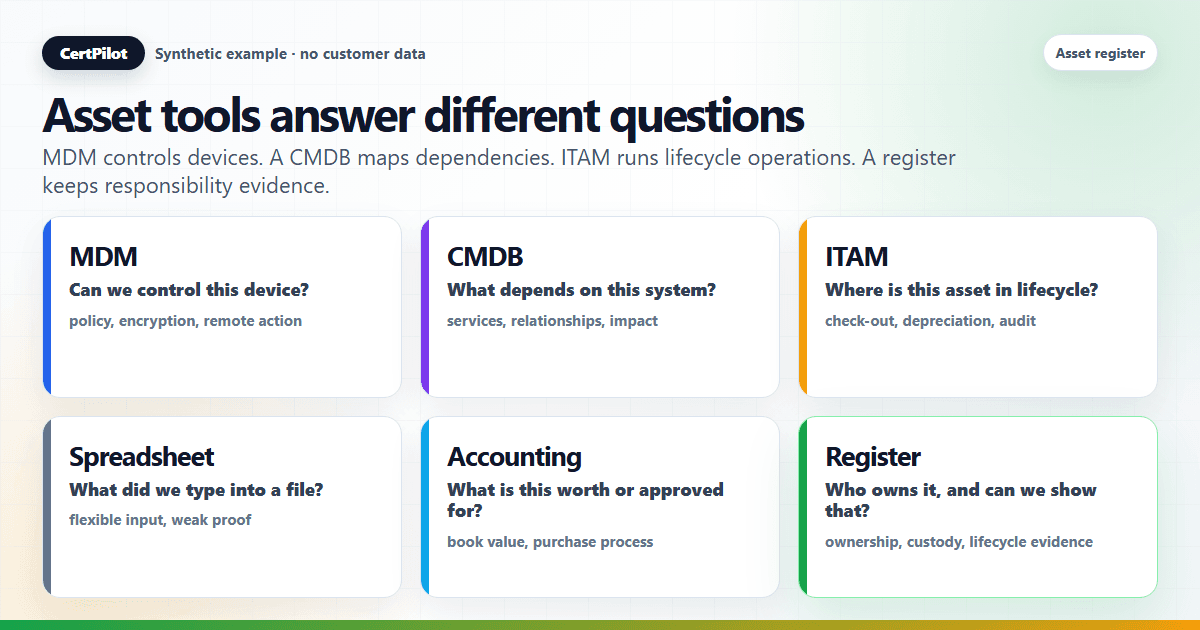
A lightweight assets register, MDM, a CMDB, a spreadsheet, and a Snipe-IT-style tool all "list your stuff," but they do different jobs. An assets register records who is responsible for what, as governance evidence. MDM manages and configures devices. A CMDB models infrastructure and dependencies. A spreadsheet is a flexible scratchpad. A Snipe-IT-style tool runs full IT asset management workflows. None of them replaces the others — and a manual-first register is designed to sit beside whichever of them you already run, not to compete with them.
This article explains what each tool is actually for, where each is strong, where each is weak specifically for management-ready governance evidence, and how a register fits alongside. If the immediate job is owner/status evidence rather than device control, CertPilot's Assets Register is the product path. It is the asset-side counterpart to the people-side comparison in people & accounts register vs HRIS, MDM, and spreadsheets; for what a register is in the first place, start with what an IT assets register is.
Why Teams Confuse These Tools
The confusion is reasonable: every one of these tools can show you a list of devices or software, so they look interchangeable from a distance. They diverge on the question they are built to answer. MDM answers "is this device configured and controlled?" A CMDB answers "how do our systems connect?" A spreadsheet answers "whatever I typed into it." A dedicated asset tool answers "where is this asset in its full lifecycle, financially and physically?" A governance register answers "who is responsible for what, and can I show that?"
Picking the wrong tool for the question is what leads to a team running a capable MDM and still being unable to hand leadership a clean ownership record — because that was never MDM's job.
What an Assets Register Is For
An assets register is a customer-maintained record of the hardware and software you hold, who is responsible for each item, and what state it is in. Its job is governance evidence: answering "what do we own, who holds it, what's retired or unaccounted for?" in a form a non-technical reader can use. It is deliberately lightweight and manual-first — you enter or import the records, covering hardware fields, software and license context, ownership and custody, and lifecycle status.
What it is not is the engine that manages, discovers, or finances those assets. That narrowness is the point: it does one job — responsibility and lifecycle evidence — without the weight of the tools below.
What MDM Is For
Mobile device management enrols, configures, and enforces policy on devices. It is the right tool when you need to push settings, require disk encryption, separate work and personal data, or take a remote action on a lost laptop. MDM is strong at control and live device state because it lives on the device.
For governance evidence its strength is also its limit: MDM knows enrolled, managed devices in technical depth, but it does not hold your ownership narrative, your spares in a drawer, the contractor's unmanaged machine, or your software licenses and renewals. It answers "is this device compliant with policy?" — not "who answers for this asset, and what does it cost to renew?"
What a CMDB Is For
A configuration management database models the items in an IT environment and the relationships between them — which service depends on which server, which application on which database. It is built for change management and impact analysis in larger or more complex IT operations: "if we take this down, what breaks?"
That power comes with weight. A CMDB is an investment to populate and keep accurate, and its value is in dependency modelling, not in a simple "who holds this laptop?" answer. For a lean team that mainly needs ownership and lifecycle evidence, a full CMDB is usually more machinery than the question requires.
What Spreadsheets Are Good For
Spreadsheets are excellent at what they are: flexible, instant, universally understood. They are the right place to start an inventory, do a bulk cleanup, or run a quick one-off analysis — which is exactly why a good register imports and exports CSV rather than asking you to abandon them.
Their weakness as governance evidence is structural, not a matter of discipline: nothing enforces an owner, a date, or a single authoritative version, so a well-kept sheet looks identical to a neglected one. The fuller version of this argument is in evidence reports vs dashboards vs spreadsheets — the short form is that a spreadsheet is a fine input and a weak deliverable.
What Snipe-IT-Style Asset Tools Are Good For
Dedicated IT asset management (ITAM) tools — Snipe-IT and others in that category — are built for the full asset lifecycle: barcode or QR check-in and check-out, depreciation, maintenance schedules, audits, and detailed asset histories. When you have a large fleet, a dedicated asset team, or genuine check-out workflows, that depth earns its keep.
For a lean team the same depth can be more process than needed. The honest question is whether you need full ITAM workflows or simply a current, owned record you can turn into evidence. A register aims at the second; an ITAM tool aims at the first, and a team can run both — the ITAM tool for operations, the register for the governance summary.
What Accounting and Procurement Systems Are Good For
Accounting and fixed-asset systems track depreciation, book value, and capital reporting; procurement systems run purchasing, approvals, and purchase orders. Both touch "assets," but from the money and process side: one answers "what is this worth on the books?", the other "how was this bought and approved?"
Neither is built to answer "who holds this device today, and is it still in use?" — and an assets register is not built to replace them. The register records the operational ownership and lifecycle picture; the finance and procurement systems own the money and the buying process. They are complementary lenses on the same equipment.
Comparison summary
- Assets Register: records responsibility and lifecycle. It is the governance evidence layer for ownership, custody, and status.
- MDM: manages and enforces device policy. It controls devices, while the register records who owns and holds them.
- CMDB: models systems and dependencies. It helps with change impact, while the register tracks accountability.
- Spreadsheet: supports flexible ad-hoc data entry. It can be an import starting point, but the register adds structure and review context.
- Snipe-IT-style ITAM: runs full asset lifecycle operations such as barcodes, depreciation, check-in/check-out, and audits. The register can still be the lean summary layer.
- Accounting / procurement: owns book value, purchasing process, depreciation, purchase orders, and approvals. The assets register owns custody and operational status.
Where CertPilot Fits — With Strict Boundaries
CertPilot's Assets Register is the governance-evidence layer, not a replacement for any tool above. It is a customer-maintained, manual-first record with CSV import and export, an owner link to People & Accounts, and a connection to the Renewals & Vendor Register for software renewals. The boundaries are deliberate:
- It records operational asset evidence; it does not discover devices or software automatically.
- It does not monitor endpoints, collect device telemetry, scan the network, run vulnerability scanning, or patch devices.
- It cannot remote wipe, lock, or control a device.
- It is not MDM, not a CMDB replacement, and not a Snipe-IT replacement.
- It is not an accounting or depreciation system and not a procurement system.
- It is not a certification or an audit guarantee — it supports internal governance routines and evidence preparation.
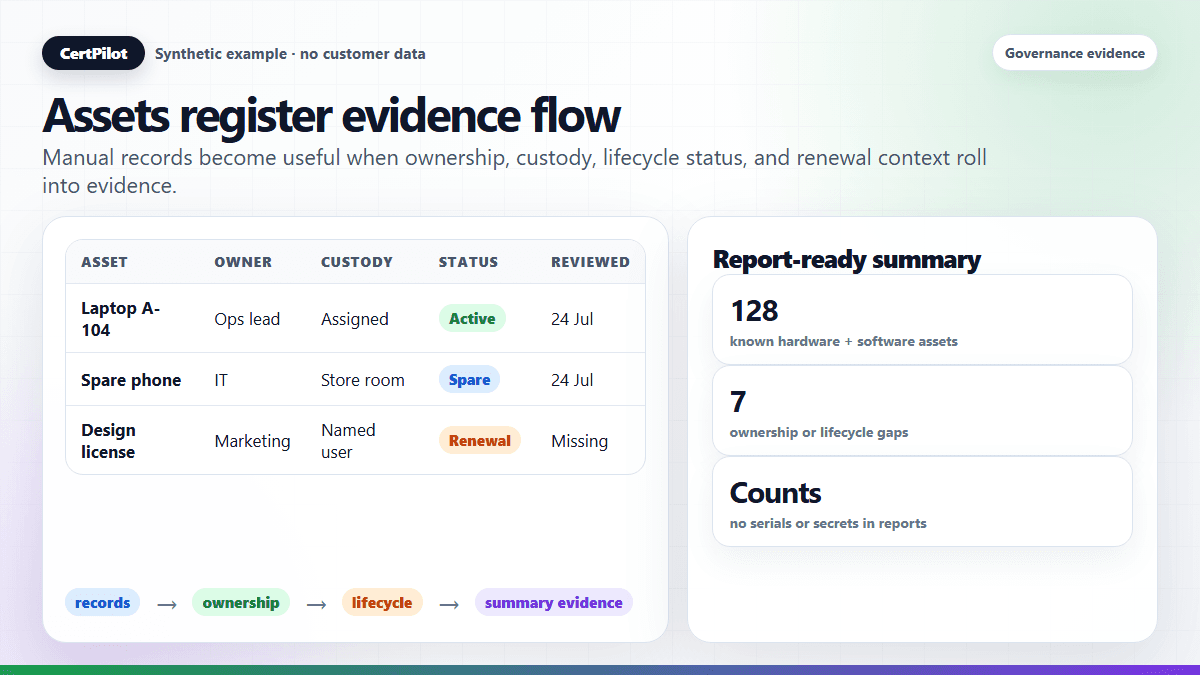
In the checks + registers → evidence reports model, the register is the internal-register half of IT governance evidence: asset data rolls up as summary counts into the cross-module evidence reports, and the sample reports gallery shows the finished artifact. There is no dedicated Assets PDF today. The fuller boundary map is in what CertPilot is and is not.
A Practical Decision Guide for Lean IT Teams
You do not have to pick one tool — you have to match the tool to the need:
- If you need to control or configure devices — encryption, remote actions, policy — you need MDM. A register does not do this.
- If you need to model system dependencies for change and impact analysis, you need a CMDB. Most lean teams do not, yet.
- If you need barcodes, depreciation, or formal check-in/out across a large fleet, a Snipe-IT-style ITAM tool fits.
- If you need book value or purchasing workflow, that is accounting and procurement, not an asset register.
- If you need to answer "what do we own, who holds it, and can I show it?" — the governance question — a lightweight assets register is enough, and a spreadsheet is the place to start before you outgrow it; a practical first 30 days turns that start into a maintained register.
Many teams run a register and one or more of the others: the specialised tools do their operational jobs, and the register turns the part leadership asks about into a clean, owned, dated record.
Fast decision tree: which tool do you need first?
If the team is debating tools, start with the question that triggered the discussion:
- "Can we lock, wipe, or enforce policy on laptops?" Start with MDM because you need device control, not a register.
- "What breaks if this server or service changes?" Start with a CMDB because you need dependency mapping.
- "Who has this laptop, and is it active or retired?" Start with an assets register because you need custody and lifecycle evidence.
- "Can we print labels and manage check-out history?" Start with an ITAM or Snipe-IT-style tool because you need full asset operations.
- "What is the book value or depreciation schedule?" Start with the accounting or finance system because you need financial records.
- "Can we show leadership what assets are owned, assigned, lost, retired, or unknown?" Start with an assets register because you need governance evidence.
This decision tree prevents a common overbuying pattern: choosing the heaviest tool because the word "asset" appears in every category. A lean team may eventually need MDM, ITAM, and a register. But if the immediate job is management evidence, a maintained register is the lighter first move.
Minimum fields before you compare tools
Before buying or rebuilding anything, write down the minimum fields the team can keep current:
- Asset name or identifier.
- Asset type: laptop, phone, software, SaaS, license, hosting, or other.
- Owner or responsible person.
- Custodian, if different from the owner.
- Lifecycle status: active, spare, retired, lost, unknown, or disposed.
- Business purpose or department.
- Renewal or replacement date where relevant.
- Last reviewed date.
- Notes that do not contain secrets.
If those fields cannot be maintained in a spreadsheet, a heavier tool will not magically create discipline. If they can be maintained, a register can turn the same information into a cleaner evidence layer and connect it to reports. That is the practical middle ground CertPilot targets.
In Short
- These tools share the word "assets" but answer different questions — control (MDM), dependencies (CMDB), ad-hoc data (spreadsheet), full lifecycle (ITAM), money/process (accounting/procurement), and responsibility and evidence (assets register).
- An assets register is lightweight and manual-first — its job is governance evidence, not device management, discovery, or finance.
- None of these replaces the others; a register is built to sit beside whatever you already run.
- CertPilot's register is not MDM, a CMDB, Snipe-IT, an accounting/procurement system, or a scanner — it records what you maintain.
- Match the tool to the need: control → MDM, dependencies → CMDB, lifecycle workflows → ITAM, value/buying → finance, "who owns what, provably" → a register.
Frequently Asked Questions
Does an assets register replace MDM?
No. MDM manages and enforces policy on devices and can take remote actions; an assets register records who owns what and its lifecycle status as governance evidence. They answer different questions and work well together — MDM controls the managed fleet, while the register also covers spares, unmanaged machines, and software, and produces the ownership record MDM was never meant to hold.
Do I need a CMDB if I have an assets register?
Usually not at a lean-team size. A CMDB models system dependencies for change and impact analysis, which is valuable in complex environments but heavy to populate and maintain. If your main need is "who holds this and is it still in use?", a lightweight register answers that without the CMDB's overhead. You can adopt a CMDB later if dependency modelling becomes a real need.
Is CertPilot a Snipe-IT alternative?
Only for lightweight governance evidence, not for full IT asset management. Snipe-IT-style tools handle barcodes, depreciation, check-in/out, and detailed asset histories; CertPilot's register focuses on ownership, custody, and lifecycle status as evidence. If you need full ITAM workflows, use a tool built for them — and a register can still sit beside it as the governance summary.
Can't I just use a spreadsheet?
For starting out, yes — and you should keep using spreadsheets for bulk edits and one-offs, which is why the register imports and exports CSV. The limit is that a spreadsheet cannot enforce an owner, a date, or a single version, so it is a strong input and a weak deliverable. A register adds that structure and turns the data into something you can hand to management.
Does CertPilot sync from my MDM, CMDB, or asset tool?
No. CertPilot does not connect to or sync from MDM, a CMDB, or other asset tools today, and it does not discover devices or software automatically. The register is manual-first: you enter records or import a CSV. That keeps it under your control and accurate to what your team actually knows.