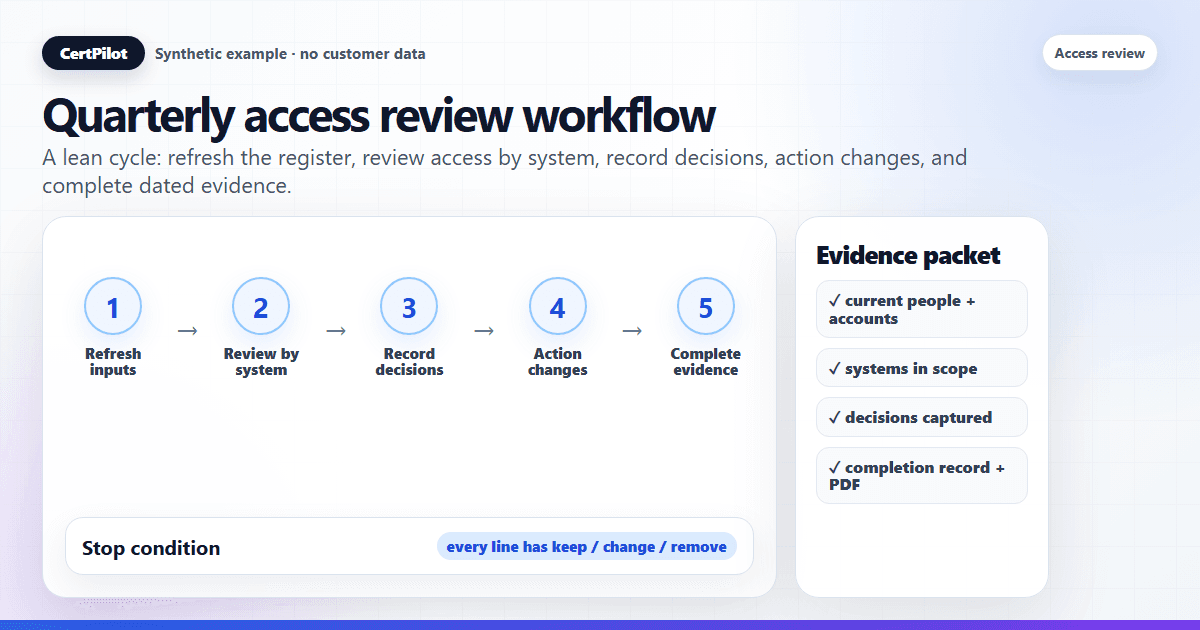
A quarterly access review is a check, run once every three months, that confirms each person still needs the access they currently hold — and leaves behind a dated record that the check actually happened. The commercial problem is not only stale access. It is being unable to show a customer, insurer, auditor, or leadership team that a real review was scoped, owned, completed, and followed up.
To run one well, make seven moves: assemble a current list of who has access to what, review that access system by system against what each role needs now, record a keep / change / remove decision on every line, act on removals inside the underlying systems, capture open actions, complete the review, and export the evidence.
This guide walks through that process the way a lean IT team or MSP actually runs it — manually, from a register, without an enterprise identity-governance platform. CertPilot's Access Reviews module is used as the worked example because it turns the review into a maintained matrix, completion log, reminders, and Access Review Register PDF, but the workflow is the same whether your register lives in a spreadsheet or a dedicated tool.
What a quarterly access review is (and is not)
A quarterly access review is a point-in-time governance control: a recurring, deliberate check that the people who can reach a system still have a current business reason to be there. It produces two outputs — corrected access (where you removed or changed something) and evidence that the review was performed, by whom, and when.
It is not a permissions audit of every setting, a vulnerability scan, or a one-time cleanup — and it is not employee monitoring, since a review looks at what access exists, not at what anyone did with it. The word evidence is load-bearing: the hardest question afterward is rarely "did you clean up access?" but "can you show that you did?" — which is why the workflow below treats dated sign-off as a first-class step and one concrete form of IT governance evidence.
Why quarterly
Quarterly is the common middle ground. Monthly reviews are heavy enough that busy teams quietly stop running them; annual reviews leave a stale account live for up to a year. Every three months keeps the data fresh enough to be honest while staying light enough to actually complete, and it maps to the cadence many cyber-insurance questionnaires and internal controls assume. The exact interval matters less than the fact that it is fixed and repeated — a review you complete on a predictable cadence is far stronger evidence than a sporadic deep clean, because it shows a routine rather than a reaction.
Before you start: the four inputs you need
A review is only as good as the data you start from. Gather these four before the review window opens:
- People list: who exists, in which role, and who has left. This usually comes from your people and accounts register or HR export.
- Systems in scope: which tools and platforms this review covers. Use a systems catalog of the apps your team runs.
- Access records: who holds which account, at what access level. Use the register or matrix of people against systems.
- Owner per system: who is accountable for confirming that system's access. Use the system's recorded business and technical owner.
If those inputs are unclear because a sole administrator left, pause and rebuild the operating map with the IT handover checklist before calling the quarterly review complete.
In CertPilot these live together: the Systems Catalog defines the systems (and which ones appear as columns), and the matrix view shows people against those systems with an access level in each cell — read/view, write/edit, admin/manage, owner, a custom value, or no access. A maintained register feeds the review so you start from real data instead of reconstructing it from memory. If you are building that view for the first time, start with How to Build a User-System Access Matrix Without an IAM Connector.
If reviewers need a clearer decision aid before sign-off, prepare a manager access review packet instead of handing them a raw permission export.
The quarterly access review workflow, step by step
Step 1 — Refresh your inputs
Before reviewing anything, bring the register current. Add joiners, mark leavers, and update account statuses. A review run against a six-week-old export proves a moment that no longer exists. This is also where offboarding evidence earns its keep: anyone marked as left should surface as an obvious row to check.
Step 2 — Decide what each role should have
For each system in scope, write down — in one line — what a person in a given role legitimately needs. "Support agents: read-only in the billing console." This baseline is what turns the review from a vibe check into a comparison. Without it, reviewers default to "looks fine," which is how rubber-stamping starts.
Step 3 — Review access by system
Work system by system, not person by person. Open the matrix for one system, look down the column, and for each person ask a specific question: does this person, in their current role, still need this level of access? Reviewing by system keeps the right owner focused on the tool they actually understand. For a Microsoft 365 or Entra tenant, one such stream is to review Conditional Access exclusions — the accounts and groups deliberately left out of a policy — as its own system-level check.
Step 4 — Record a decision on every line
Every line gets an explicit outcome: keep, change (raise or lower the level), or remove / no access. "No decision" is not an option — a skipped line is exactly the account that survives untouched for another year. Record the decision against the record, not in your head.
Step 5 — Act on removals in the real system
CertPilot records the decision; it does not reach into Google Workspace, Microsoft 365, or any other system to revoke access. So when you decide to remove or downgrade, make that change in the underlying system yourself, then update the register to reflect it. The register is the evidence that the change was decided and done — the action happens where the account lives.
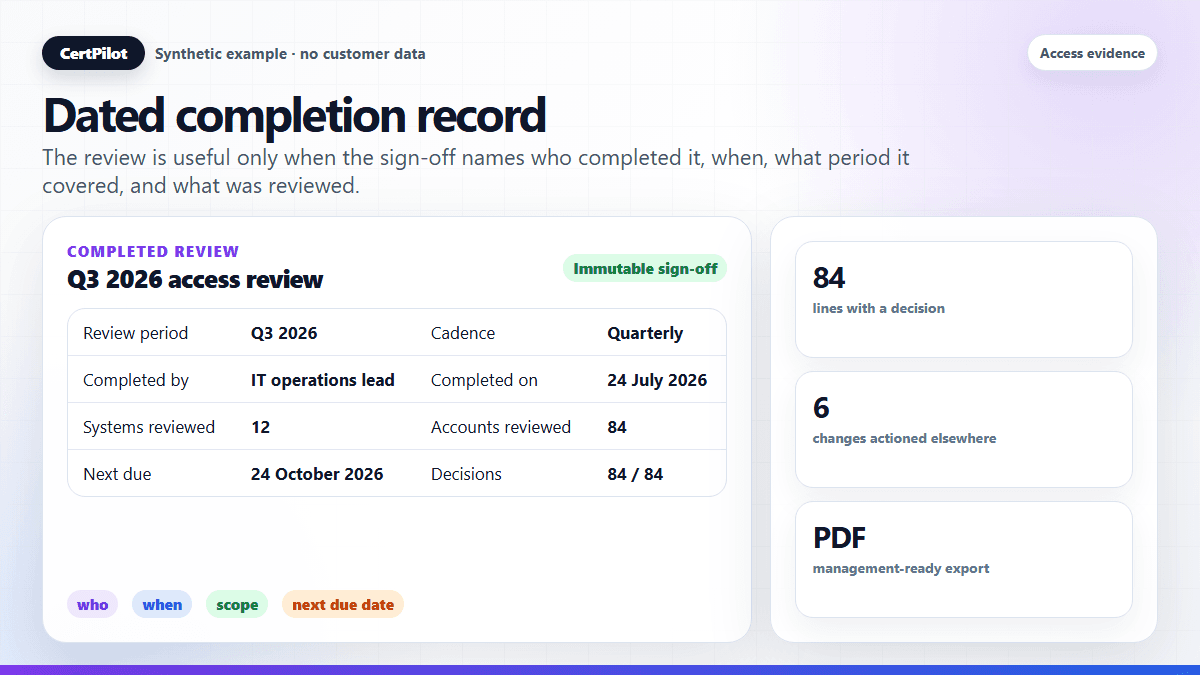
Step 6 — Complete the review (capture sign-off)
Once every line has a decision, complete the review. In CertPilot this writes one immutable completion record for the whole register: who completed it, the date, the review period, the cadence, the next due date, an optional note, and snapshot counts. This is the difference between "we reviewed access" as an assertion and a dated event you can point to. You no longer have to mark every row "reviewed" just to prove the review happened — the completion event is the sign-off. For the exact fields to capture at that moment, use Access Review Completion Log: What to Record at Sign-Off.
Step 7 — Export the evidence
Generate the Access Review Register PDF. It captures the access records grouped for review and, when one exists, the latest completed-review summary with reviewer, period, cadence, next due date, and snapshot counts. That artifact is what you hand to leadership, a client, or an auditor. The sample reports gallery shows the exact format before you produce your own.
A quarterly access review checklist
- Inputs refreshed: joiners added, leavers marked, and statuses current.
- Role baselines written: each system has a one-line "who should have what" rule.
- Access reviewed by system: every column walked top to bottom.
- Decisions recorded: every line is keep / change / remove — no blanks.
- Removals actioned: changes made in the real systems and reflected back.
- Review completed: immutable sign-off captured with date and counts.
- Evidence exported: Access Review Register PDF saved for the period.
What to prepare before the review window opens
The cleanest quarterly review is usually prepared before the quarter ends. Do these checks one week before the review window opens:
- Close obvious people gaps. Add joiners, mark leavers, and correct anyone whose role or team changed.
- Confirm the systems in scope. Decide whether the quarter covers all systems or only high-risk systems such as email, finance, admin consoles, customer systems, and core SaaS.
- Name the owner for each system. If nobody owns a system, record that as a finding rather than pretending the review can be complete.
- Decide the decision vocabulary. Keep, change, remove, no access, and needs follow-up are usually enough. Avoid twenty custom statuses.
- Set the evidence expectation. Tell reviewers that every line needs a decision and that the completed review will be exported as evidence.
This preparation keeps the actual review from becoming a data-cleanup project. A review should test whether current access is appropriate; it should not be the first time anyone discovers who exists or which systems matter.
Example evidence packet for one quarterly cycle
For a lean team, a complete packet can be simple:
- People/account register snapshot: proves the population reviewed; usually from the manual register or CSV import.
- Systems catalog: proves the systems included and their owners.
- Review matrix decisions: proves the keep / change / remove decisions made during the cycle.
- Completion log: proves who completed the review and when.
- Access Review Register PDF: gives management a readable export of the result.
- Follow-up note: records which removals or changes were actioned elsewhere, such as in a ticket, admin console, or internal note.
The follow-up note is important because CertPilot records the review decision; it does not remove access from the underlying system. If you decide to remove a user from a finance platform, the removal still happens in that platform. The evidence trail should show the decision, the completion record, and where the operational change was made.
How to avoid a rubber-stamp review
The most common failure mode is not a missed system — it is a reviewer clicking "approve all" without actually checking. A review that happens on paper but not in reality is worse than no review, because it produces false confidence and false evidence. Three habits prevent it:
- Review by exception. Instead of confirming every line is fine, hunt for the lines that are not: admin access on a non-admin, a contractor who rolled off, a shared account no one will claim. Make the reviewer find problems, not rubber-stamp the absence of them.
- Give each system a named owner who answers for it. Diffuse responsibility produces diffuse review. When one person owns a system's access, "approve all" becomes their name against a decision. Define what the people manager and system owner each verify before sign-off so the two responsibilities do not collapse into a rubber stamp.
- Compare against the role baseline from Step 2. A review with a written expectation is a comparison; a review without one is a guess.
Where the evidence comes from
Three live features carry the evidence load. The completion log records each review as a dated, immutable event. The Access Review Register PDF is the exportable artifact. And reminder emails — enabled from workspace settings — send scheduled nudges before an upcoming due date so the review is not forgotten and you are not chasing people from scratch. Reminder delivery is idempotent per due date, so the same due date is not emailed repeatedly; there is no separate delivery-log screen today. Access-review counts (not names) also flow into the Monthly Proof and Weekly Governance reports, so the cadence shows up in your wider management-ready evidence.
What CertPilot does and does not do here
- It does keep a customer-entered register, a systems catalog, a review matrix, an immutable completion log, reminder emails, and an Access Review Register PDF.
- It does not connect to Google Workspace, Microsoft 365, an HR system, or any identity provider — records are entered or imported by CSV.
- It does not discover accounts automatically or remove, disable, or deprovision access. You make changes in the underlying system; the register records that you did.
- It does not detect segregation-of-duties conflicts automatically, monitor employee activity, score productivity, or read emails, documents, chats, or files.
- It is not a compliance certification, legal advice, or an audit guarantee. It produces operational evidence that a review was performed.
Start your next quarterly review
If you are running access reviews from a spreadsheet today, the fastest upgrade is a register that produces dated sign-off automatically. Set up your systems and people in Access Reviews, run one quarterly cycle end to end, and export the Access Review Register PDF — then look at the sample reports to see the deliverable a manager or auditor actually receives.
In short
- A quarterly access review confirms, every three months, that each person still needs the access they hold — and records dated proof that the check happened.
- Run it in order: refresh inputs, set role baselines, review by system, record a decision on every line, action removals in the real system, complete the review, export the PDF.
- Avoid rubber-stamping by reviewing by exception, naming an owner per system, and comparing against a written baseline.
- CertPilot records and reports the review; it does not connect to directories, discover accounts, or remove access — those happen in the underlying systems.
- The evidence is operational governance documentation, not certification, legal advice, or an audit guarantee.
Frequently Asked Questions
How long should a quarterly access review take?
For a lean team with a maintained register, a focused review of the systems that matter usually takes a few hours, not days. Most of the time goes into Step 1 (refreshing inputs) and Step 5 (actioning removals). If a review is taking days, the cost is almost always stale data at the start, not the review itself — which is the argument for keeping the register current between cycles.
What is the difference between a quarterly access review and an audit?
An access review is an internal control you run yourself: you confirm access is still appropriate and record that you did. An audit is an independent assessment, often by a third party, that may use your access review evidence as an input. CertPilot helps you produce the review evidence; it does not certify compliance or guarantee any audit outcome.
Do I have to review every system every quarter?
Not necessarily, but you should be explicit about scope. A common pattern is reviewing the highest-risk systems (email, admin consoles, finance, core SaaS) quarterly and lower-risk systems less often. Whatever you choose, write the scope down so the evidence shows what was — and was not — covered.
How do I prove the review actually happened?
Complete the review so there is a dated, immutable sign-off record (who, when, the period, the cadence, the next due date, and snapshot counts), then export the Access Review Register PDF. A completed review backed by a current register is a dated record; "we review access" on its own is just an assertion.
Does CertPilot connect to Google Workspace or Microsoft 365 to pull access?
No. Access Reviews are customer-entered. The module does not connect to Google Workspace, Microsoft 365, HR systems, or identity providers, and it does not discover accounts or remove access automatically. You enter or import the records and make any access changes in the underlying systems yourself.