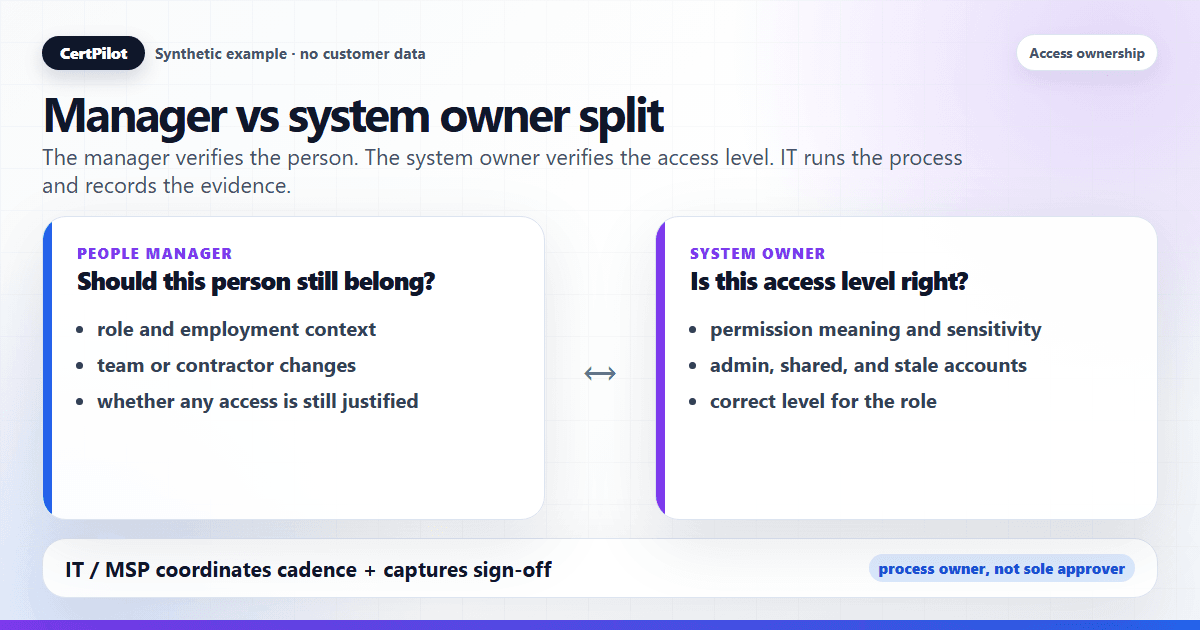
In an access review, the people manager confirms whether a person should still have access at all, and the system owner confirms whether the access they hold is the right level for that system. IT usually runs the process and keeps the evidence. The single most common cause of a weak, rubber-stamped review is leaving those responsibilities unclear, so nobody truly verifies anything and the final evidence cannot explain who approved what.
This article defines the two reviewer roles, shows which questions each one is best placed to answer, and explains how to assign ownership in practice so reviews are genuinely verified rather than waved through. It uses CertPilot's Access Reviews module as the worked example because the product path is ownership → decision fields → completion sign-off → Access Review Register PDF. Once ownership is clear, prepare a manager access review packet that gives each reviewer enough context to decide instead of rubber-stamping.
The two reviewer roles, defined
An access review is a periodic check that everyone who can reach a system still needs that access. Two perspectives make that check honest, and they are not interchangeable.
The people manager
The people manager knows the person. They can answer questions the system owner cannot: Is this person still in the role they were hired for? Did they change teams? Are they a contractor whose engagement has ended? The manager is the authority on whether the person still belongs in scope at all. When someone moves from sales to support but keeps their old CRM admin rights, it is usually the manager — not the system owner — who is positioned to catch it.
The system owner
The system owner — sometimes called the application owner — knows the tool. They understand what each access level inside it actually means, which permissions are sensitive, and what "appropriate" looks like for a given role. They are the authority on whether the level of access is right. The manager may confirm a person should have some access to the finance system; the system owner is the one who knows that "admin" was excessive and "approver" was the correct level.
Which role answers which question
Splitting the questions by role is what stops a review collapsing into "looks fine to me."
- People managers answer: is this person still employed or engaged, did the role or team change, and should this person have any access to the system?
- System owners answer: is the access level correct, is the permission unusually sensitive, and is this a stale shared or service account?
- Both roles share accountability: the manager supplies people context, the system owner supplies permission context, and the final decision should be recorded rather than implied.
Neither column is complete on its own. A manager who does not understand the system approves access levels they cannot evaluate. A system owner who does not know the person approves access for people who may have left. Pairing the two is what turns a review into real verification.
Where IT (the review runner) fits
In most lean teams, IT or an MSP does not own every system in the business sense — but IT runs the review and keeps the evidence. Think of three distinct hats:
- Process owner (IT / MSP): schedules the review, maintains the register and systems catalog, chases sign-off, and produces the evidence. This is the orchestrator role.
- System owner: confirms access levels for the systems they are accountable for.
- People manager: confirms whether each person still belongs.
Conflating these is where reviews go wrong. When IT both runs the process and is treated as the sole approver for systems it does not really own, you get sign-off from someone without the context to judge — which is rubber-stamping with extra steps. IT's job is to make it easy for the right owner to decide, and to record who decided.
A practical RACI for lean teams
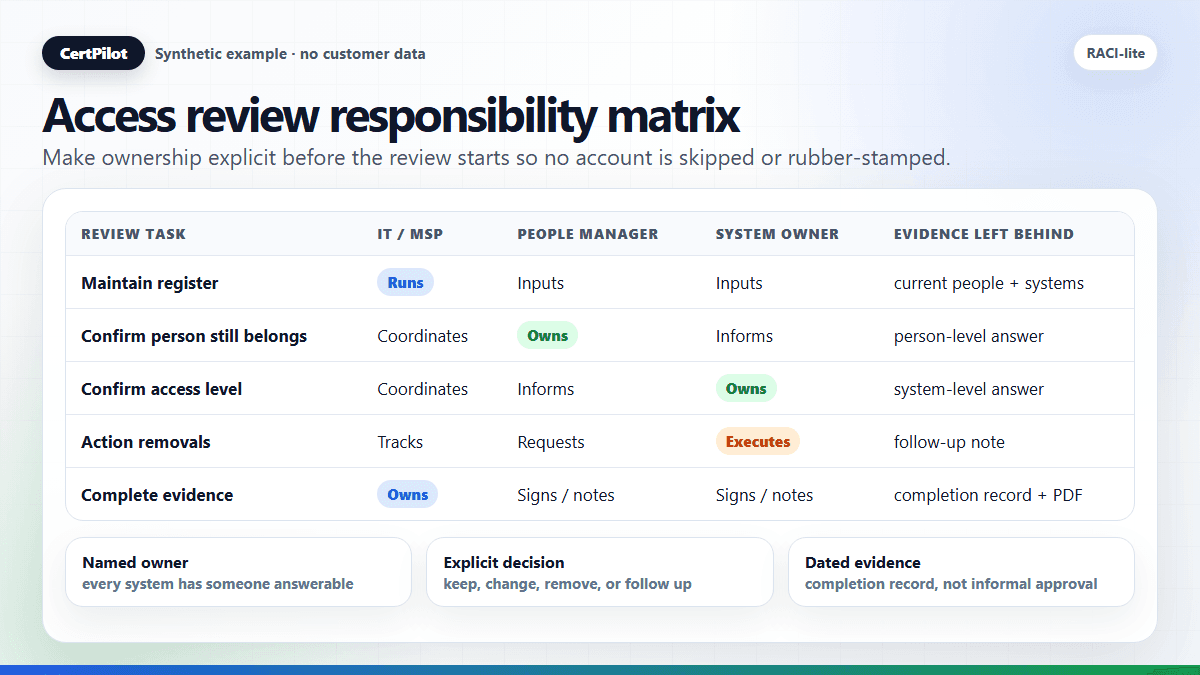
You do not need a heavy governance model to split responsibility. A lightweight RACI-style split is enough:
- Maintain people and system records: IT or the MSP is responsible; managers and system owners provide inputs.
- Confirm whether a person still belongs: the people manager is responsible; IT coordinates the request.
- Confirm whether the access level is right: the system owner is responsible; the manager provides role context.
- Chase missing decisions: IT runs the follow-up, but managers and system owners remain accountable for their rows.
- Action removals or downgrades: the relevant system owner or admin performs the change; IT tracks evidence.
- Complete the review record: IT completes the formal record and names manager/system-owner participation in the note where useful.
The useful part is not the acronym. It is forcing a decision before the review starts. If "system owner" is blank for the finance platform, the review should not quietly proceed as if ownership exists. Record the gap, assign a temporary owner, or remove the system from scope with a note that explains why. Silent ambiguity is what creates weak evidence later.
For small teams, one person may hold multiple roles. That is acceptable as long as the questions stay separate. The same founder, IT lead, or operations manager can answer both "does this person still belong?" and "is admin access appropriate?" — but they should answer them deliberately, not collapse them into a single approve-all action.
What goes wrong when ownership is unclear
Unclear ownership is not a cosmetic problem; it is the root cause of the failures teams complain about most:
- Rubber-stamping. When no one is clearly accountable, whoever is asked clicks "approve all" to make the request go away. The review happens on paper, not in reality.
- Skipped accounts. An account with no obvious owner has no one to ask "is this still needed?", so it gets quietly skipped and survives another cycle — often the exact stale or shared account that matters most.
- No accountability after the fact. Months later, no one can say who signed off on what, or when. The review produced activity but no defensible record.
Each of these is an ownership gap, not a tooling gap. The fix is to assign a named owner to every system before the review, and to capture who signed off when it completes.
What to do when no owner is obvious
Unowned systems are common in companies that grew through tool-by-tool adoption. A department bought a SaaS product, the original buyer left, IT inherited login support, and now nobody is sure who should approve access. Do not hide that reality. Use this sequence:
- Find the operational owner. Who asks for changes, approves spend, or complains first when the system breaks?
- Find the technical owner. Who knows how roles, admin rights, and account removal work?
- Assign a temporary review owner. If no perfect owner exists, nominate the best available person for this review cycle.
- Record the ownership gap. A missing owner is useful evidence. It shows the register found a governance gap that needs cleanup.
- Revisit before the next cycle. Temporary owners should not become permanent by accident.
This keeps the review honest. A system with no clear owner is not a reason to skip the review; it is exactly the kind of weakness a review should expose.
How to assign owners in practice
CertPilot's Systems Catalog is built for exactly this split. Each system you define can record a business owner and a technical owner, alongside its criticality, lifecycle status, and support contact:
- Business owner ≈ the accountability for whether access to this system is appropriate (often a manager or department lead).
- Technical owner ≈ the accountability for how the system is configured and what each access level means (often the system owner / admin).
Defining a system once in the catalog means every review references the same owners instead of re-litigating "who's responsible for this?" each quarter. The systems you mark for review become the columns in the matrix, so reviewers see people against the systems they own. (One honest boundary: the catalog is a manual workflow backbone — it organizes ownership and feeds other modules by copying text, but it does not enforce a hard database link, and it does not sync owners from any directory. You keep it current.)
For the people side, a people and accounts register gives managers the current list of who exists and who has left, and an explicit owner per account means every line is answerable by someone. Getting these fields right in the register is what makes the manager-vs-owner split work in practice rather than on a diagram.
If reviewers assume SSO already covers the whole estate, review the access inventory blind spots SSO does not show before narrowing the review scope.
Recording who signed off
The two roles can review perfectly, but if the sign-off is not captured, the accountability evaporates. When you complete a review in CertPilot, it writes one immutable completion record for the register: who completed it, the date, the review period, the cadence, the next due date, an optional note, and snapshot counts. That record is what answers "who signed off, and when?" long after the review is done — and it is the input to the broader job of showing management that access is under control.
For systems where multiple owners contribute, a practical pattern is: each owner reviews their systems in the matrix, IT confirms every line has a decision, and then IT completes the review with a note naming the owners who participated. The completion event is the single sign-off; the note carries who did what.
What CertPilot does and does not do here
- It does record business and technical owners per system, organize people and accounts, drive a review matrix, and capture an immutable sign-off with reminder emails and an Access Review Register PDF.
- It does not assign owners automatically, sync them from Google Workspace, Microsoft 365, or an HR system, or enforce a database link between modules — ownership is customer-maintained.
- It does not remove or change access, detect segregation-of-duties conflicts automatically, monitor employee activity, or read emails, documents, chats, or files.
- It is not a compliance certification, legal advice, or an audit guarantee. It produces operational evidence that the right people reviewed access.
Decide ownership before your next review
Ownership is a decision to make once and reuse. Define each system's business and technical owner in Access Reviews, assign people managers to confirm the person-level question, and let IT run the cadence and capture sign-off. Then see the dated artifact this produces in the sample reports gallery before your next quarterly cycle. If you are still mapping out the cycle itself, the step-by-step quarterly access review guide covers the full workflow.
In short
- The people manager answers "should this person have access at all?"; the system owner answers "is the level right?" — use both.
- IT / the MSP runs the process and keeps the evidence but should not be the sole approver for systems it does not own.
- Unclear ownership is the root cause of rubber-stamping, skipped accounts, and missing accountability — assign a named owner per system before the review.
- CertPilot records business and technical owners and captures an immutable sign-off; it does not assign owners automatically, sync directories, or remove access.
- The output is operational governance evidence, not certification, legal advice, or an audit guarantee.
Frequently Asked Questions
Should the manager or the system owner sign off the access review?
Both contribute, but to different questions. The manager confirms whether the person still belongs (role, team, employment); the system owner confirms the access level is appropriate. In a lean team, IT typically runs the process and records a single completion sign-off, with a note capturing which owners reviewed which systems.
What if one person is both the manager and the system owner?
That is common in small teams and is fine — just be deliberate about it. Review the person-level question (does this person still belong?) and the system-level question (is the level right?) as two separate checks, even if the same person answers both. The risk in small teams is collapsing them into a single "looks fine," which is how rubber-stamping starts.
How do I record business owner vs technical owner?
In CertPilot's Systems Catalog, each system has a business owner field and a technical owner field. Define the system once and both owners carry into every review that references it. The catalog is manual-first — it does not pull owners from a directory, so you keep the assignments current.
Who is responsible if no owner is assigned?
No one — which is exactly the problem. An account with no owner has no one to confirm it is still needed, so it tends to get skipped and survive. Assign an owner to every system before the review; an unowned system is itself a finding worth recording.
Does CertPilot decide ownership or pull it from our directory?
No. Ownership is customer-maintained. CertPilot does not connect to Google Workspace, Microsoft 365, or any HR or identity system, and it does not infer owners. You record business and technical owners yourself, and the review references what you entered.