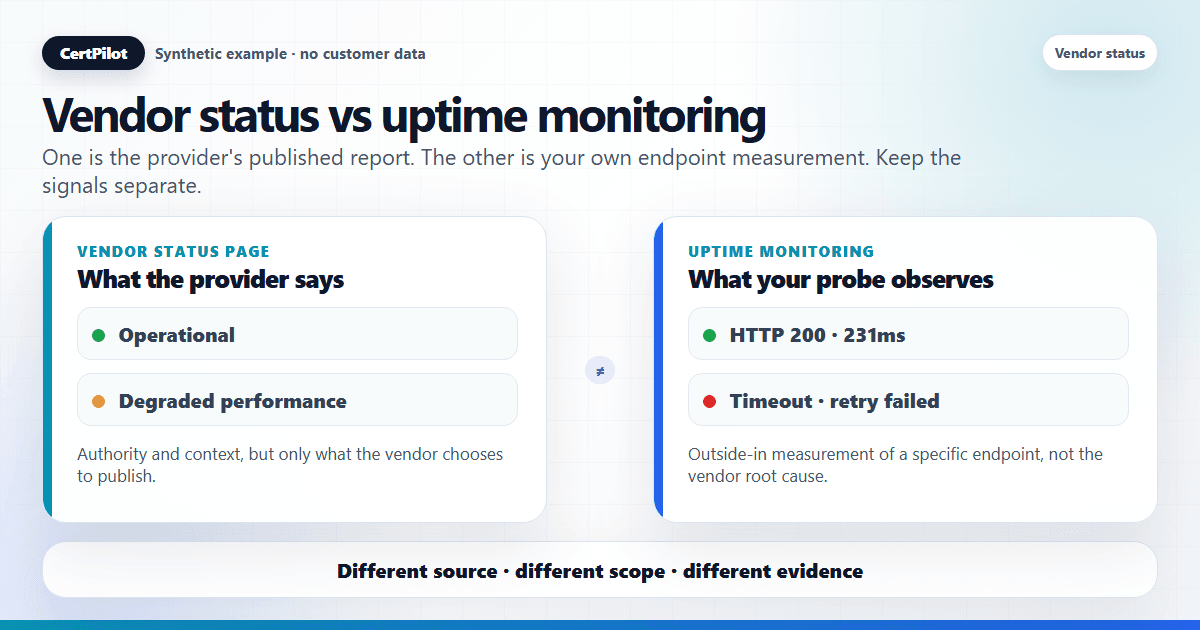
A vendor status page shows what the provider reports about its own service: operational state, incidents, maintenance windows, and update history. Uptime monitoring actively checks whether an endpoint responds from the outside, from your point of view. They answer different questions: a status page tells you what the vendor says, and uptime monitoring tells you what an external probe observes. Neither one tells you the whole story, and for most IT teams the two are complementary rather than competing.
This article explains what each one shows, where public vendor feeds fit, and how CertPilot uses official vendor status data without pretending to be an uptime monitor.
Short Answer
A vendor status page is the provider's self-reported operational state. Uptime monitoring is your own external measurement of whether a service responds. Use vendor status to learn what the provider is willing to confirm; use uptime monitoring to learn whether the thing you point at is actually reachable. If a status page says "operational" but your uptime check fails, you have learned something real — and vice versa.
What Vendor Status Pages Show
A vendor status page is published by the provider and reflects the provider's own view of its platform. Typical contents:
- A high-level state such as "operational," "degraded performance," "partial outage," or "major outage."
- Named incidents with a short description, severity, and an updating timeline.
- Component- or region-level breakdowns, when the vendor chooses to publish that granularity.
- A history of past incidents and maintenance windows.
Its strengths are authority and context: it is the vendor speaking about the vendor, often with detail an outside observer cannot infer. Its limits are equally important. A status page updates on the vendor's schedule, not continuously; it reflects the vendor's decision to publish; and it describes the platform overall, not your specific tenant. A green page is the absence of a published incident — not a guarantee that you are unaffected.
What Uptime Monitoring Shows
Uptime monitoring (also called synthetic monitoring) actively sends requests to an endpoint — a URL, host, or service — from one or more external locations and records whether it responds, how fast, and with what result. Typical contents:
- Up/down state based on real probe attempts.
- Response time and latency trends.
- Error details such as timeouts, TLS failures, or unexpected status codes.
- Alerting when a probe fails a configured number of times.
Its strength is that it measures observed reality from the outside: it does not wait for anyone to publish anything. Its limits are scope and perspective. Uptime monitoring sees the specific endpoint you point it at, from the specific vantage point of the probe. It cannot explain why something failed inside the vendor, and a passing probe does not prove every feature or every user's path is healthy.
Comparison summary
- Source of truth: a vendor status page is the vendor's own report; uptime monitoring is your external probe.
- What it measures: a status page shows vendor-declared service state; uptime monitoring checks whether an endpoint responds.
- Perspective: a status page describes the vendor's platform overall; uptime monitoring describes the specific endpoint you target.
- Timing: a status page updates on the vendor's schedule; uptime monitoring updates on each probe interval.
- Unpublished issues: a status page cannot show what the vendor has not published; uptime monitoring may detect an issue if the probe hits the failure.
- Tenant specificity: a status page is not tenant-specific; uptime monitoring is specific only to the endpoint you own or point at.
- Root cause: a status page may provide the vendor's explanation; uptime monitoring observes symptoms, not causes.
That distinction is the heart of the difference: one is a report, the other is a measurement. Treating either as the complete picture is where teams get into trouble.
Where Public Vendor Feeds Fit
Public vendor status feeds are the machine-readable or structured form of a status page. They let a tool collect many vendors' reported states on a schedule and show them in one normalized view, instead of a person checking a dozen pages by hand.
They sit firmly on the "report" side of the comparison. A vendor feed inherits every strength and every limit of the status page behind it: authoritative wording, but only as current and as complete as the vendor chooses to publish. A feed is excellent for centralizing "what are my vendors reporting today?" It is not a substitute for measuring your own endpoints.
For the operating workflow around selecting feeds, interpreting vendor-reported status, and recording an incident without claiming tenant impact, start with the free Vendor Status Checker and the vendor status monitoring guide.
When to Use Each
Match the tool to the question:
- Reach for vendor status when the question is "is one of our providers having a known incident?" — during triage, when you need a credible line for leadership, or when you want to avoid debugging a problem the vendor has already owned.
- Reach for uptime monitoring when the question is "is this specific thing up right now?" — for endpoints you own or directly depend on, where you need outside-in confirmation and fast alerting regardless of what anyone publishes.
In practice, an incident usually pulls in both: the vendor's report frames what they say is wrong, and your own measurements (uptime checks, plus the systems you control) frame what you can actually observe.
What evidence to keep during a vendor incident
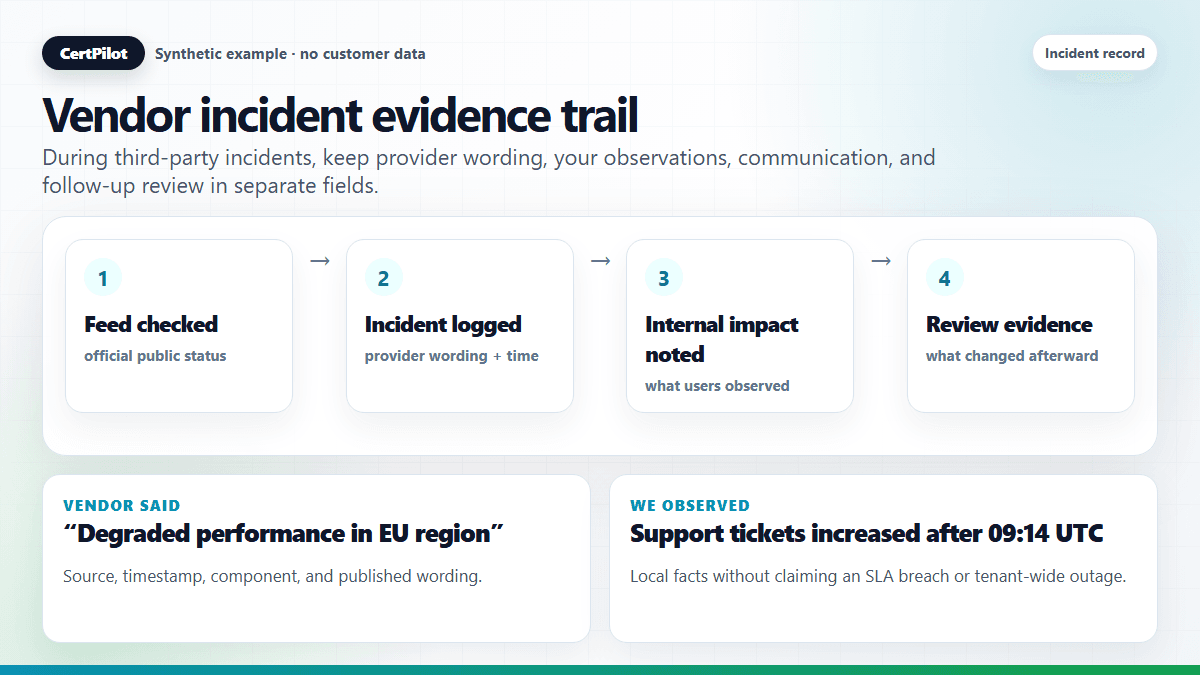
The practical problem for lean IT teams is not only finding out whether a vendor is down. It is reconstructing the story later: what did the provider report, when did you notice it, what did your own users see, and what did you tell management or clients? A lightweight incident evidence trail should keep those facts separate.
- Vendor status source: where the provider-published fact came from, such as the official status page or feed URL.
- First observed time: when your team noticed the signal, for example 09:14 UTC.
- Provider wording: what the vendor actually said, such as "degraded performance in EU region".
- Components or regions: which published components or regions were affected, to avoid overclaiming impact.
- Your own observation: what your users, logs, probes, or support team saw.
- Communication sent: what was told to users, clients, or leadership.
- Follow-up review: whether the vendor should be added to a watch list or the internal runbook should change.
This is not the same as proving an SLA breach. It is operational evidence. It helps a team explain what happened without overstating certainty or relying on memory.
A simple triage runbook
When something looks wrong, use this sequence:
- Check the vendor's official status page or feed. Record the state and timestamp.
- Check your own service or endpoint. Use uptime monitoring, logs, support reports, or admin consoles where you control them.
- Classify the gap. Vendor red / probe green means the incident may not affect you. Vendor green / probe red means keep investigating your own path.
- Communicate carefully. Say "the vendor reports..." when using provider wording and "we observe..." when using your own data.
- Record the follow-up. Note whether the vendor should be added to a recurring watch list or whether your own monitoring needs improvement.
That wording discipline matters. It avoids turning a public status feed into a false claim of customer-specific outage and avoids treating an uptime probe as if it explains the vendor's root cause. For a practical sequence operators can run during a real incident, use the step-by-step vendor outage checking method.
What not to infer from a green status page
A green vendor page is useful, but it is not proof that every tenant, region, feature, or integration is healthy. It only means the provider is not currently publishing an incident for the components it chooses to show. Treat it as one input, not the final answer.
Do not infer that:
- your specific tenant is unaffected;
- a regional or feature-specific issue is impossible;
- your own DNS, SSL, identity, browser, or network path is healthy;
- no users are experiencing problems;
- the vendor will never backfill an incident later.
The safe sentence is: "The vendor status page is currently green, and we are still checking our own path." That keeps communication accurate while the team investigates.
Why Both Can Be Useful
The two are strongest when read side by side, because the gaps between them are informative:
- Status green, probe failing: likely a tenant-specific, regional, or local issue the vendor has not published — keep investigating your side.
- Status incident, probe passing: the vendor's incident may not touch your path, region, or feature — you may be fine despite the headline.
- Both red: strong corroboration that a real, vendor-side problem is hitting you — communicate and wait for resolution.
- Both green: reassuring, but still not proof that every user's experience is perfect.
The disagreements are not noise. They are exactly the signal that helps you separate "the vendor says X" from "we observe Y."
How CertPilot Uses Vendor Status Data
CertPilot is on the vendor status side of this comparison, by design. Vendor Status Watch reads official public vendor feeds, caches the reported status server-side, and normalizes the different formats into one consistent view. A daily scheduled refresh keeps it current by default, with a manual "Refresh now" inside the logged-in dashboard; the public Vendor Status Checker is read-only with no refresh button.
To be explicit about the boundary: CertPilot does not perform synthetic uptime monitoring, does not validate SLA breaches, and does not confirm account-level outages. It reports what vendors publish — it does not probe endpoints, use customer credentials, or claim tenant-specific impact. For the public-facing technical facts CertPilot does check directly — SSL, DNS, domain registration, and email authentication on the domains you manage — see External Footprint Monitoring and the methodology page, which document exactly what each check covers and does not cover.
So a complete picture for a lean IT team often combines three layers: vendor-reported status (what providers say), external footprint checks on your own domains (public facts CertPilot verifies), and, where you need outside-in endpoint measurement, a dedicated uptime tool.
Read the Right Signal for the Right Question
The mistake is asking one tool to answer the other's question. Use a status page or feed to learn what a vendor is reporting, and an uptime check to learn whether an endpoint responds. To centralize the first layer, check cached vendor-reported status signals in the free checker, and track selected vendors in CertPilot so your team's dependencies stay in one normalized view — without overstating what a status page can prove.
Frequently Asked Questions
Is a status page enough on its own?
Not usually. A status page tells you what the vendor reports, on the vendor's schedule. It cannot detect an unpublished issue or confirm your specific tenant is healthy. Pairing it with measurement of the endpoints you care about gives a fuller picture.
Does CertPilot do uptime monitoring?
No. CertPilot reads official public vendor status feeds and caches the reported state. It does not run synthetic uptime probes, measure latency, or test whether an arbitrary endpoint responds. For endpoint probing you would use a dedicated uptime monitoring tool alongside it.
Can vendor status or CertPilot confirm an SLA breach?
No. Status pages publish operational descriptions, not contractual uptime measurements, and CertPilot does not validate SLAs or confirm account-level outages. Treat status as an indicator and rely on your contract and the vendor's reporting for SLA questions.
Why might a vendor show "operational" while my service is failing?
Status pages describe the vendor's platform overall and update when the vendor decides to publish. Your problem could be local, regional, tenant-specific, or simply newer than the vendor's latest update. That gap is exactly why teams also check their own systems.
What does CertPilot monitor directly?
CertPilot directly checks public-facing technical facts on the domains you manage — SSL/TLS certificates, DNS records, domain registration data, and email-authentication records — through External Footprint Monitoring. Vendor status, by contrast, is read from each provider's own published feed rather than measured by CertPilot.