AccessOwl and CertPilot can both help a team run recurring user access reviews, but they solve the problem at different layers.
Choose AccessOwl when you need current user and permission data pulled from connected applications, reviewers prompted in Slack, and access changes automated where an integration supports them—or assigned to an application administrator where it does not.
Choose CertPilot when you want a lighter, lower-access process: maintain or CSV-import an access register, review people against systems, track actions and due dates, record an immutable completion event, and generate a dated Access Review Register PDF.
CertPilot is less expensive on published list prices, especially at higher headcounts. It is not, however, a cut-price identity governance and administration platform.
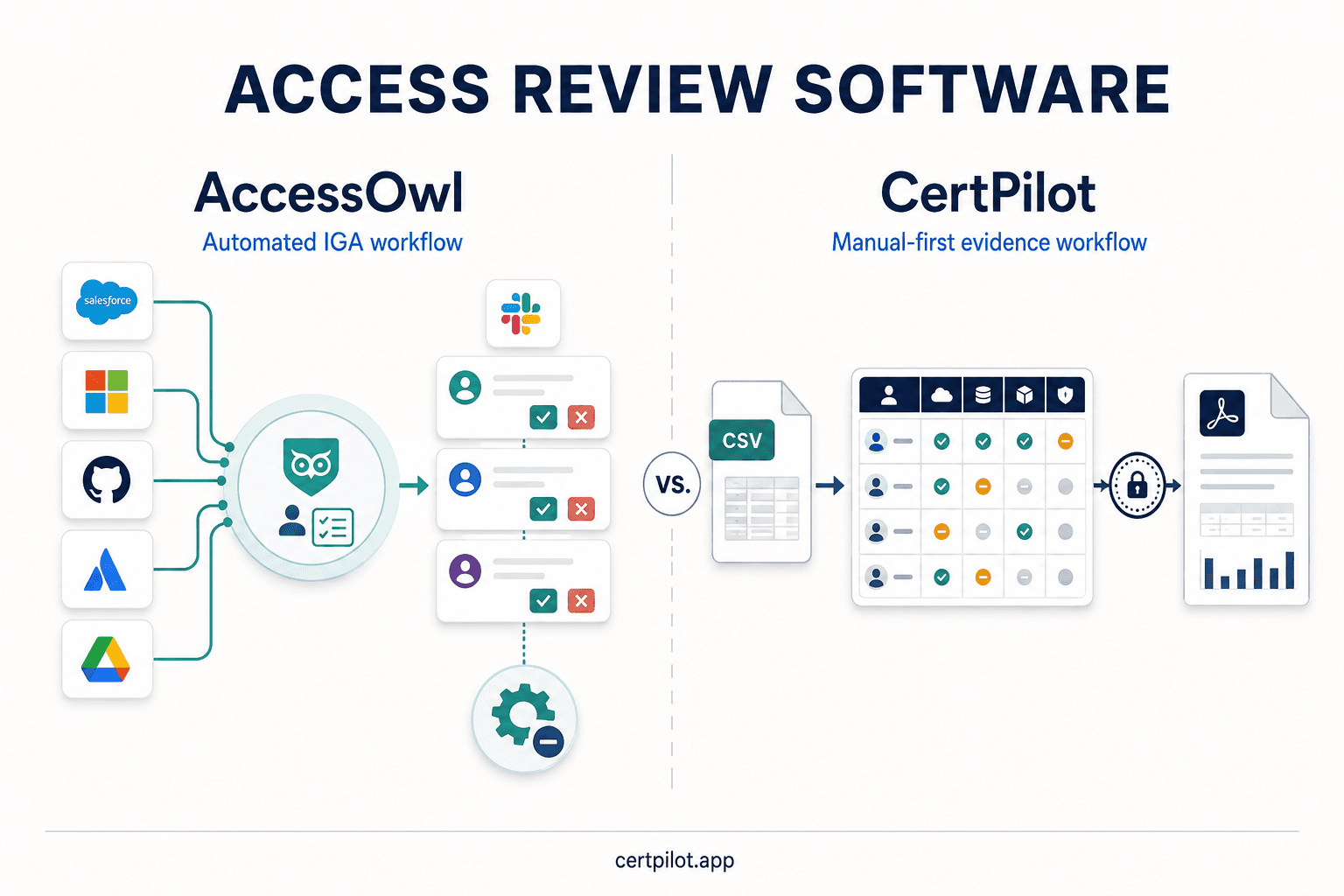
CertPilot does not discover accounts, sync directories, or revoke access. If those actions are requirements rather than conveniences, AccessOwl—or another IGA/IAM product—is the more appropriate category.
In short
-
AccessOwl is the stronger fit for automated data collection, Slack-native review participation, HRIS context, access requests, onboarding and offboarding, and connected remediation.
-
CertPilot is the stronger fit for manual-first access governance, CSV portability, a formal completion record, a dedicated PDF artifact, and wider lightweight IT evidence across domains, renewals, people, accounts, assets, and vendor status.
-
AccessOwl publishes its Growth plan, which includes Access Reviews, at $6 per paid user per month with a $250 monthly minimum. Its pricing page separately lists an Account Provisioning Module at $2.50 per user per month.
-
CertPilot publishes flat workspace plans at €99, €199, and €299 per month. All live registers and on-demand evidence reports are included in Starter.
-
G2 currently shows AccessOwl at 4.7/5 from 13 reviews. Capterra shows 5.0/5 from one review on the listing found during research. These are positive but small samples, and no dedicated AccessOwl Trustpilot profile was found.
-
CertPilot does not yet have an established review footprint on G2, Capterra, or Trustpilot. That is missing independent evidence, not evidence of poor quality.
-
The best buying test is operational: use three representative applications, complete a real review, revoke one access path, and inspect the final evidence—not just the product demo.
Are AccessOwl and CertPilot direct alternatives?
Only for teams whose immediate question is: How should we run and prove recurring access reviews?
AccessOwl presents itself as an identity governance and administration tool. Its access-review workflow is built around extracting user lists and permissions, assigning reviewers, sending Slack reminders, processing or forwarding access changes, and sharing evidence. The product also covers access requests, approvals, onboarding, offboarding, SaaS discovery, vendor management, and optional provisioning and spend modules.
CertPilot is an IT governance evidence platform. Its Access Reviews module is a customer-entered register with a Systems Catalog, matrix and entries views, review states, due dates, scheduled reminder emails, an immutable Completion Log, CSV import/export, and an Access Review Register PDF. It does not connect to applications or identity providers.
The overlap is therefore real but narrow:
-
Both organize systems, people, access levels, owners, reviews, follow-up, and evidence.
-
AccessOwl can obtain and act on live connected data.
-
CertPilot records the team's declared state and review decision without private-system access.
If you need a system to discover and change access, CertPilot is not a direct replacement. If you already have reliable exports and administrators who perform changes in each application, CertPilot may cover the evidence workflow without the cost and access requirements of a connected IGA product.
AccessOwl vs CertPilot: side-by-side comparison
Capability comparison at a glance
- Primary job: AccessOwl is for identity governance and SaaS access automation. CertPilot is for IT governance registers and evidence reports. Different product categories with access-review overlap.
- Source of access data: AccessOwl can use connected applications, directories, HRIS data, OAuth discovery, and manual/custom app paths. CertPilot uses customer-entered or CSV-imported records. Use AccessOwl for live data; use CertPilot for a maintained register.
- Systems catalog: AccessOwl has an application catalog with assigned, discovered, and ignored applications. CertPilot has a manual Systems Catalog that defines the review matrix. Both, with different data sources.
- User and permission sync: AccessOwl supports this per integration capability. CertPilot has no connectors or directory sync. Use AccessOwl.
- Review interface: AccessOwl is Slack-native for reviewer prompts plus web administration. CertPilot uses web matrix and entries views. Choose based on reviewer habits.
- Reviewer reminders: AccessOwl sends custom Slack reminders. CertPilot sends scheduled email reminders before due dates. Both, through different channels.
- HRIS context: AccessOwl Growth lists 70+ HRIS integrations. CertPilot has no HRIS connection. Use AccessOwl.
- Access requests and approvals: Included in AccessOwl's broader workflow. Not available in CertPilot. Use AccessOwl.
- Onboarding and offboarding: AccessOwl automates workflows tied to connected systems. CertPilot can record follow-up, but has no automated lifecycle action. Use AccessOwl.
- Automatic access change: AccessOwl supports changes where the connected app and purchased modules allow it. CertPilot cannot change source-system access. Use AccessOwl.
- Manual remediation path: AccessOwl can forward work to an assigned application administrator. CertPilot tracks action-required and revoked states while the administrator changes access in the source app. Both can support a human path.
- Application ownership: AccessOwl uses a Business Owner and Application Admin model. CertPilot stores business and technical owners per catalogued system. Both.
- Review completion history: AccessOwl has review history and evidence workflow. CertPilot has an immutable Completion Log with reviewer, date, period, cadence, next due date, note, and snapshot counts. Inspect the exact output.
- Evidence output: AccessOwl documents the review and can send finished evidence to Vanta. CertPilot produces a dedicated Access Review Register PDF plus cross-module evidence reports. Different destinations and formats.
- Vanta evidence sync: supported by AccessOwl through OAuth. CertPilot has no Vanta connector. Use AccessOwl.
- CSV portability: CertPilot has a clearly documented manual CSV path for the access register. Confirm AccessOwl import/export needs during trial.
- SaaS discovery: AccessOwl Growth includes Shadow IT detection. CertPilot has no SaaS discovery. Use AccessOwl.
- Public domain checks: CertPilot runs daily SSL/TLS, DNS, RDAP/domain-expiry, and email-authentication checks. Use CertPilot when this adjacent evidence matters.
- Other governance registers: AccessOwl has vendor and renewal features in its suite. CertPilot includes Renewals & Vendors, People & Accounts, and Assets registers. Compare fields and evidence needs, not module names alone.
- Private-system permissions: AccessOwl automation may require OAuth scopes, a dedicated integration account, admin access, and an inbox. CertPilot requires no application or directory credentials because teams enter or import register data. Material security and effort trade-off.
- Free trial: AccessOwl publishes 7 days. CertPilot publishes 14 days, no credit card. CertPilot offers more evaluation time.
- Published access-review price: AccessOwl Growth is $6/paid user/month with a $250 minimum; annual billing advertises 15% savings. CertPilot is €99/€199/€299 per workspace/month. CertPilot is lower on list price, but not feature-equivalent.
- Compliance result: Neither product certifies the organization. Certification still comes from an auditor.
This comparison reflects public product information checked on 21 August 2026. AccessOwl integration capabilities vary by application, and CertPilot's internal registers remain manual-first.
The core difference: automate the system or document the review
An access review contains at least five separate jobs:
-
identify every in-scope application;
-
obtain a credible list of accounts and permissions;
-
route each decision to the right reviewer;
-
make and verify required access changes; and
-
preserve evidence that the review happened.
AccessOwl tries to automate that chain. CertPilot structures the human process around it.
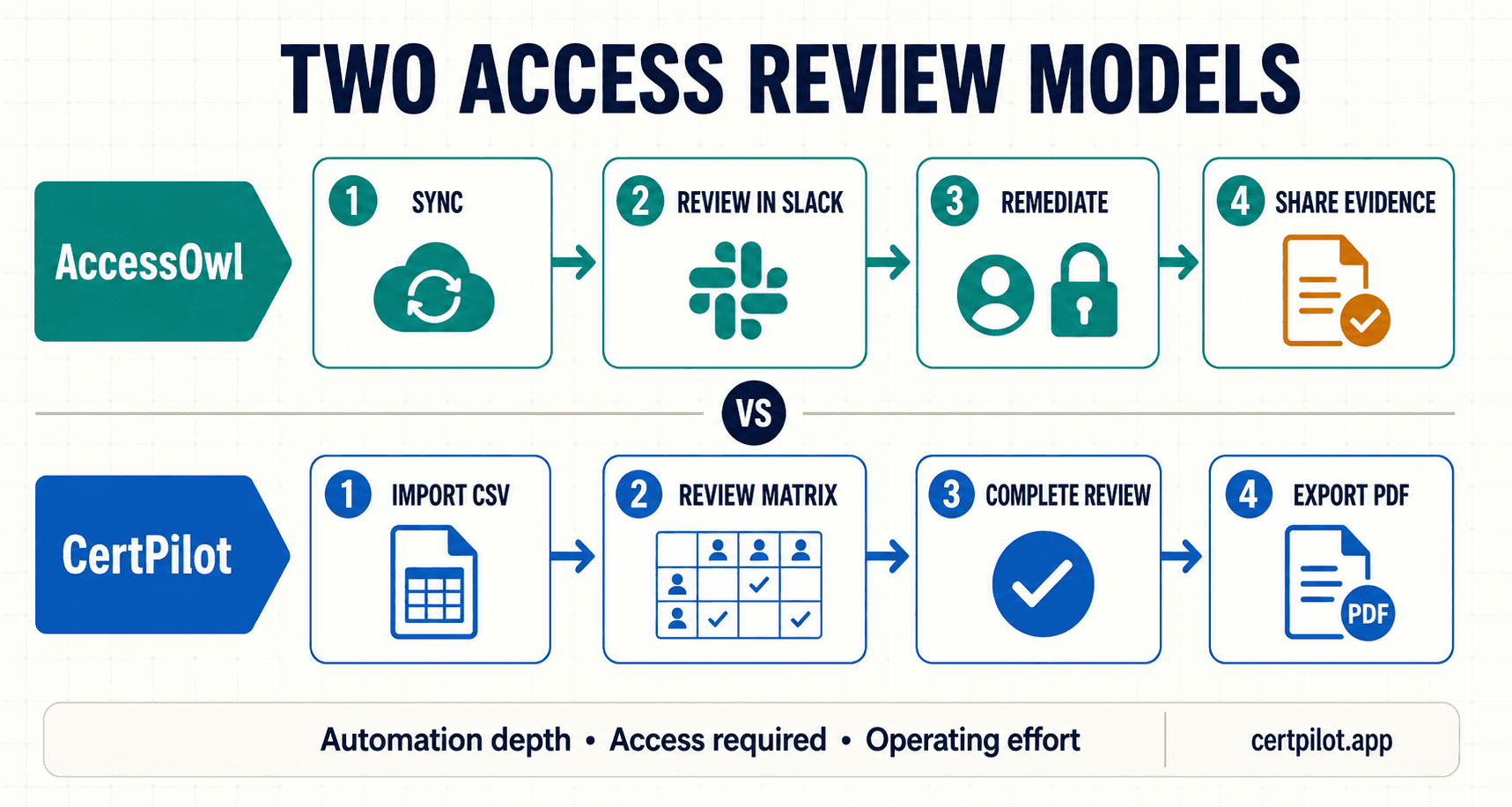
This distinction affects both risk and workload. Automation can reduce stale exports and manual chasing, but it depends on connector coverage, privileges, configuration quality, and the meaning of the source data. A manual-first process avoids granting another platform administrative access, but the team remains responsible for collecting accurate exports and closing changes in every application.
The honest question is not whether automation or manual work is universally better. It is which failure mode your team can control:
-
stale or incomplete manual data;
-
an unsupported long-tail application;
-
broad integration-account privileges;
-
reviewers ignoring another workflow;
-
a revoke decision that is never executed; or
-
evidence that cannot be understood outside the tool.
How an AccessOwl access review works
AccessOwl's published workflow is designed to reduce the administrative work around a review.
1. Build the application and identity picture
AccessOwl can connect to directories such as Google Workspace, Microsoft 365, or Okta and to supported HR systems. Its documentation says HRIS sync can bring in manager, department, title, and employee lifecycle context—important inputs when managers are reviewers.
Application discovery can also use Google or Microsoft OAuth signals. Applications that are not discovered can be added from a catalog or created as custom entries.
2. Sync users and permissions where supported
The AccessOwl integration documentation separates capabilities such as structure sync, user sync, provisioning, directory sync, HRIS sync, and access-review evidence. That separation matters: an application appearing in the catalog does not mean every capability is available for it.
For integrations with user sync, AccessOwl's application guide says user lists are updated approximately every three hours. During evaluation, verify this behavior with your exact apps and permission structures rather than relying on the headline integration count.
3. Route review decisions through Slack
AccessOwl can invite reviewers and send custom reminders in Slack. This can lower participation friction for a Slack-forward organization because managers can act in a familiar interface instead of learning a separate reviewer portal.
The trade-off is equally practical: teams that standardize on Microsoft Teams or email should test whether the workflow still fits. One G2 reviewer also noted limitations caused by Slack message-length constraints.
4. Process or assign access changes
The AccessOwl access-review page says decisions can be processed through more than 200 integrations or forwarded to the relevant application administrator. Its pricing page separately lists an Account Provisioning Module at $2.50 per user per month and describes provisioning to 400+ applications.
Those statements make one buying question essential: Which review-driven removals are included in Growth, which require the provisioning add-on, and which will become manual administrator tasks? Get the answer by application in writing.
5. Preserve and share evidence
AccessOwl documents the review and can send completed access-review evidence to Vanta when that integration is configured. If Vanta is already the destination for compliance evidence, this can remove another export-and-upload step.
How a CertPilot access review works
CertPilot deliberately avoids application and directory connections. The team brings its own data and remains the authority for every access decision.
1. Define the Systems Catalog
The Systems Catalog defines the columns in the access matrix. Each system can have a business owner and a technical owner, plus optional criticality, lifecycle, support, and recovery context.
Inactive systems can be hidden from new entries while historical access records remain visible. CertPilot also blocks deletion when records still reference a system, preventing a catalog cleanup from silently removing evidence.
2. Import or enter access records
Teams can start from an existing spreadsheet by CSV or add entries manually. Records can include the person, account email, department, title, system, access level, reviewer or owner, review state, action required, last reviewed date, and next due date.
This is a portability advantage, not a freshness guarantee. CertPilot cannot know that a new account exists until the team imports or records it.
3. Review the matrix by exception
The matrix shows people as rows and systems as columns. Cells can represent read/view, write/edit, admin/manage, owner, custom access, or no access. The purpose is to question exceptions—such as an administrator role for a contractor—not to make a blanket approval look efficient.
The entries view provides the record-level workflow for adding, editing, importing, exporting, and cleaning up access data.
4. Track actions and make changes in the source system
Action-required and overdue states identify decisions that still need follow-up. The actual change happens in Google Workspace, Microsoft 365, GitHub, Salesforce, or whichever application owns the access.
This boundary should be included in the operating procedure: a CertPilot status is not proof that the source application changed. The reviewer or administrator should confirm the source-system action before the record is marked revoked or resolved.
5. Record completion and generate evidence
One Completion Log row is an immutable evidence event for the whole register. It captures the reviewer, completed date, review period, cadence, next due date, optional note, and snapshot counts. This keeps the working register separate from the sign-off event.
Scheduled access-review reminder emails can be enabled in workspace settings. A daily check sends reminders before upcoming due dates and is idempotent for the same due date. CertPilot does not currently expose a separate reminder-delivery history.
The final artifact is a dated Access Review Register PDF, with CSV export available for portability. CertPilot's public sample gallery uses fictional data so buyers can inspect the report format before starting a trial.
Five differences that matter in a real review
1. Data freshness
AccessOwl has the advantage when a supported integration can sync users and permissions. The review begins closer to the current state and avoids repeated administrator exports.
CertPilot is only as current as the data entered or imported. That can be acceptable for a small quarterly process if the runbook requires fresh exports, but it becomes harder to defend as the number of people, systems, roles, and changes grows.
Test freshness with known edge cases: a person who left yesterday, a contractor whose end date changed, a newly assigned administrator, a suspended account, a service account, and an entitlement nested below a broad role.
2. Integration coverage
AccessOwl's public materials currently use several integration numbers: the access-review page refers to 200+ integrations for changes, the integration documentation says over 300 applications, and the pricing page advertises provisioning to 400+ applications. These may describe different capabilities or different update cycles.
Do not buy a headline number. Create an application coverage sheet with one row per in-scope system and columns for:
-
user sync;
-
permission or structure sync;
-
provisioning;
-
deprovisioning;
-
review evidence;
-
required privileges;
-
sync frequency; and
-
manual fallback owner.
CertPilot has no connector coverage to verify because every internal record is manual or CSV-imported. Its risk is missing data, not a partially capable connector.
3. Reviewer experience
AccessOwl's Slack workflow is likely to be faster when managers already live in Slack. G2 reviewers repeatedly mention Slack integration and ease of use as strengths.
CertPilot keeps the review in its web matrix and uses email reminders for due dates. This can be better when a small IT owner runs the review centrally, but it provides less delegated, in-channel automation.
Measure reviewer experience by completion rate and time, not by visual preference. Give two real managers the same ten decisions and observe what needs explanation.
4. Remediation and closure
AccessOwl can automate supported changes and route unsupported work to app administrators. CertPilot can track action-required and revoked states but never changes the source application.
For either tool, test the complete chain. A recorded revoke decision is not enough. Confirm the account or entitlement was actually removed, record who verified it, and ensure the final evidence distinguishes completed remediation from pending work.
5. Evidence destination
AccessOwl is attractive when access-review evidence should flow into Vanta or remain attached to a wider identity workflow. CertPilot is designed around a readable, dated PDF that can be handed to management, an MSP client, or someone preparing for an audit conversation.
Ask the actual recipient to assess both outputs. Evidence that satisfies an IT administrator may still be too technical for leadership or too incomplete for an auditor's request.
Pricing: AccessOwl vs CertPilot
The published prices make CertPilot the lower-cost option, but the price difference reflects a capability difference.
AccessOwl pricing places Access Reviews in the Growth plan at $6 per paid user per month, subject to a $250 monthly minimum. The page advertises a 7-day free trial and 15% savings for annual billing. Account Provisioning is listed separately at $2.50 per user per month; Spend Management is $1.50 per user per month. Enterprise pricing is not published.
CertPilot pricing is flat per workspace rather than per headcount:
-
Starter — €99/month: all live registers, CSV import/export, all on-demand evidence reports, daily public checks, daily digest, and up to 100 monitored domains;
-
Professional — €199/month: adds grouping and branded reports, with capacity for up to 250 monitored domains; and
-
Portfolio — €299/month: adds higher evidence-volume headroom, priority support and import help, and up to 500 monitored domains.
Monthly list-price scenarios
- 25 paid users: AccessOwl Growth is still the $250/month minimum, or $3,000/year at monthly list price. CertPilot remains €99 / €199 / €299 per workspace per month.
- 40 paid users: AccessOwl Growth is still the $250/month minimum, or $3,000/year at monthly list price. CertPilot remains €99 / €199 / €299 per workspace per month.
- 50 paid users: AccessOwl Growth lists at $300/month, or $3,600/year at monthly list price. CertPilot remains €99 / €199 / €299 per workspace per month.
- 100 paid users: AccessOwl Growth lists at $600/month, or $7,200/year at monthly list price. CertPilot remains €99 / €199 / €299 per workspace per month.
- 250 paid users: AccessOwl Growth lists at $1,500/month, or $18,000/year at monthly list price. CertPilot remains €99 / €199 / €299 per workspace per month.
These are public list-price illustrations, not quotes. They exclude tax, currency conversion, annual discounts, negotiated terms, implementation effort, and optional modules. AccessOwl's $250 minimum means its published Growth price remains $250 through roughly 41 paid users; 42 users at $6 equals $252.
Do not compare the last columns as if dollars and euros were interchangeable. More importantly, do not compare them as if the products delivered the same automation. The useful cost equation is:
subscription + setup + connector administration + manual exports + reviewer time + remediation time + evidence preparation + cost of missed access
For example, at 100 paid users, AccessOwl Growth lists at $600 per month. If the Account Provisioning Module is required for all 100 paid users, the two published rates total $850 per month before taxes and discounts. Confirm how AccessOwl defines a paid user and how its minimum and add-ons apply to your quote.
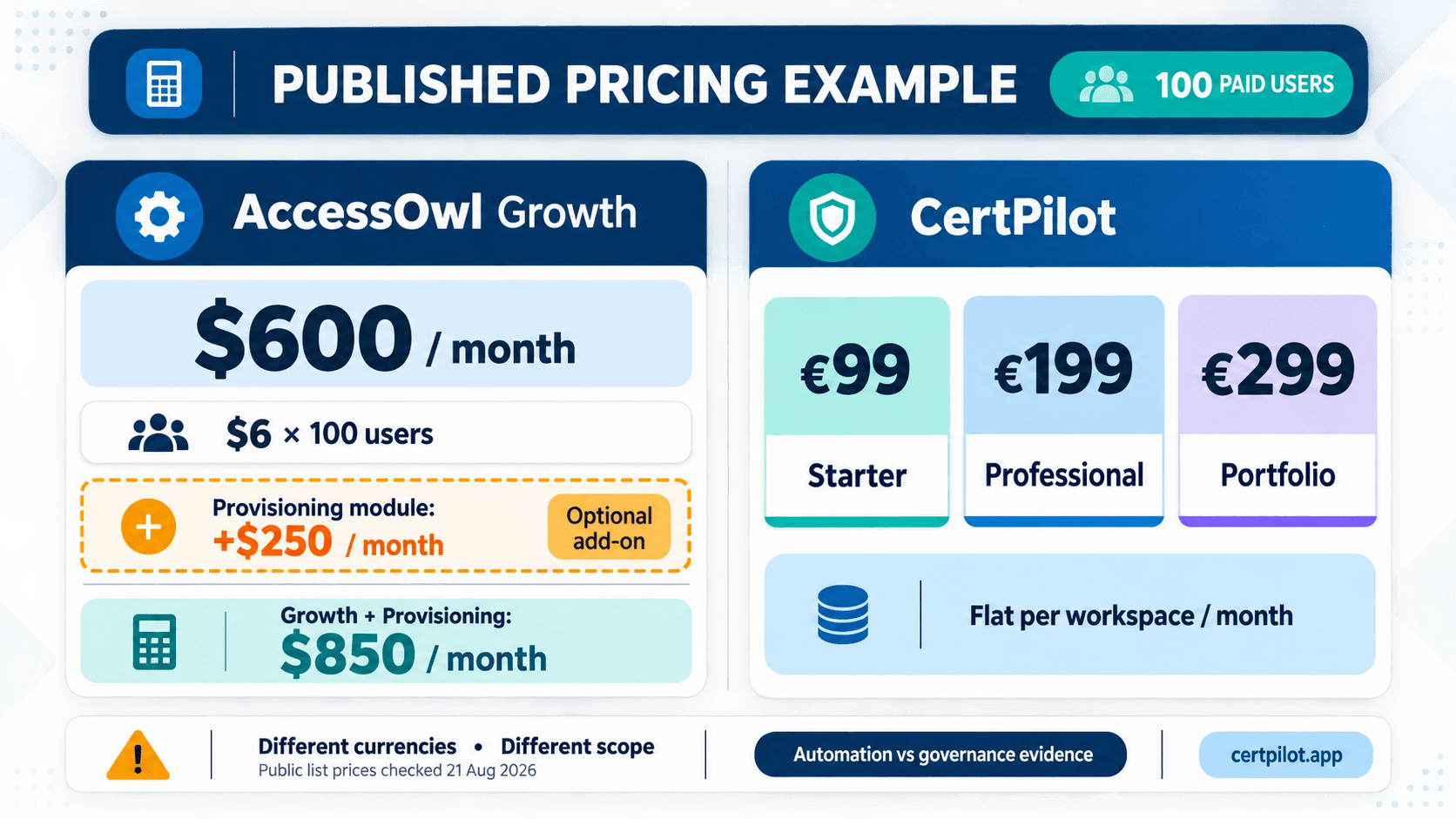
CertPilot Starter lists at €99 per month regardless of headcount, but your team supplies the exports, reconciliation, and source-system changes. At 100 users across dozens of frequently changing applications, that labor may matter more than the subscription difference.
What G2, Capterra, and Trustpilot reviews show
Independent review evidence for this comparison is limited. Treat it as qualitative input, not a statistically robust verdict.
- G2: AccessOwl evidence found was 4.7/5 from 13 reviews, with 11 five-star and 2 four-star reviews shown in search results. No established CertPilot listing was found during this research. Treat this as a positive AccessOwl signal with a small sample.
- Capterra: AccessOwl evidence found was 5.0/5 from one visible review. No established CertPilot listing was found during this research. One review cannot establish a general customer pattern.
- Trustpilot: no dedicated AccessOwl or CertPilot profile was found in the searches performed. Absence is not a rating and should not be treated as one.
Recurring positives in AccessOwl reviews
G2 reviewers commonly praise the Slack experience, straightforward setup, responsive support, onboarding and offboarding workflows, and the reduction in spreadsheet work. Reviewers describe use across both small businesses and mid-market organizations.
The single visible Capterra reviewer, an information-security leader at a 201–500 employee financial-services company, praised ease of use, HRIS and directory integration, and Slack integration.
Recurring cautions in AccessOwl reviews
The visible review set also provides useful evaluation questions:
-
Some G2 reviewers wanted more integrations or noted that long-tail applications still require human work.
-
One reviewer described setup work around templates, roles, and application permissions.
-
Another suggested that very large organizations with complex processes may not map cleanly to the product.
-
Slack message constraints, shadow-IT noise, and UX or customization gaps appear in individual reviews.
-
The Capterra reviewer wanted broader integration coverage.
These are not universal defects. They are scenarios to reproduce during a trial.
What the review evidence cannot tell you
Thirteen G2 reviews and one Capterra review are not enough to establish reliability, support quality, or implementation outcomes for every customer. Most of the visible G2 reviews were posted in June or July 2024, so they may not reflect the 2026 product precisely.
CertPilot's lack of established listings makes external validation thinner still. A buyer should compensate by inspecting the live product, sample reports, export path, contractual terms, support response, and references where available.
Which product should you choose?
Choose AccessOwl when
-
You need user and permission lists pulled from live systems.
-
Slack is the natural place for managers to review and approve.
-
HRIS data should determine managers, departments, roles, start dates, or offboarding events.
-
Access requests, onboarding, offboarding, and access reviews should share one workflow.
-
Supported revoke decisions should be executed automatically.
-
Finished access-review evidence should flow into Vanta.
-
The organization accepts the required application connections and integration-account model.
-
The value of reducing manual work justifies per-user pricing.
Choose CertPilot when
-
A small team can reliably export or maintain access data itself.
-
You want to avoid giving a review platform application or directory credentials.
-
The main requirement is a repeatable register, review sign-off, follow-up states, and readable PDF evidence.
-
CSV portability matters.
-
The same workspace should also cover domain health, email authentication, renewals, vendors, people, accounts, assets, and public vendor-status signals.
-
Flat per-workspace pricing matters more than connected automation.
-
You understand that access changes must happen in the source application.
Stay with a spreadsheet when
-
You have only a handful of systems and infrequent staff changes.
-
One accountable owner can complete the review without chasing other managers.
-
Existing exports are easy to reconcile.
-
Nobody needs a dedicated completion event or recurring evidence artifact.
-
The team is still discovering which fields, owners, and cadence it needs.
A disciplined spreadsheet is better than an automated platform nobody configures—or a governance register nobody updates.
Consider another IGA product when
-
You need complex enterprise entitlement models, separation-of-duties analysis, deep approval policies, or extensive identity infrastructure.
-
Your critical applications are not supported at the required capability level.
-
Slack-first participation does not fit the organization.
-
Your security or architecture standards do not accept the integration-account approach.
-
You need scale, reporting, or regional requirements that neither product demonstrates during evaluation.
A 14-day evaluation plan that tests the whole review
Do not evaluate access-review software with a clean demo tenant. Use representative complexity and finish the process end to end.
Days 1–2: define success
Choose three applications:
-
a major directory or collaboration suite;
-
a critical application with granular permissions; and
-
a long-tail application that is likely to require a manual path.
Define five measurable outcomes: source-data coverage, reviewer completion time, remediation closure, evidence quality, and total operating effort.
Days 3–5: build a known-answer dataset
Include at least:
-
one former employee;
-
one contractor with an end date;
-
one administrator whose privilege should be reduced;
-
one service or shared account;
-
one user with two permission levels; and
-
one legitimate exception with an owner and expiry date.
Record the correct answer before importing or connecting anything. This gives you a way to measure missed accounts and incorrect mappings.
Days 6–8: test collection and participation
For AccessOwl, document the connection method, required privileges, sync frequency, and supported capabilities for each application. For CertPilot, time the export, cleanup, CSV import, and reconciliation work.
Ask two actual reviewers to complete decisions without coaching. Record time to completion, questions asked, reminders received, and whether the interface exposes enough context to avoid blanket approvals.
Days 9–11: test remediation
Revoke or reduce one non-production access path. Verify the source system, not only the review tool.
For AccessOwl, note whether the change is automatic, requires the Account Provisioning Module, or becomes an administrator task. For CertPilot, document who made the underlying change and how the record was updated afterward.
Days 12–14: inspect evidence and calculate cost
Complete the review, export the artifact, and give it to the person who would actually consume it: management, a client, an auditor, or a compliance owner.
Then calculate annual cost using your real paid-user definition, selected modules, internal labor, and expected growth. Include setup and quarterly operation—not only the subscription.
Questions to ask AccessOwl before buying
-
Which of our applications support user sync, permission sync, provisioning, and deprovisioning separately?
-
How fresh is the data for each integration, and how are sync failures shown?
-
Which access-review changes are included in Growth, and which require the Account Provisioning Module?
-
How is a paid user defined? Are contractors, suspended users, service accounts, or application administrators billable?
-
Does the $250 minimum apply differently under annual billing or when add-ons are purchased?
-
Which apps require a dedicated integration account, administrative privileges, or a licensed mailbox?
-
What happens when an RPA, screen-scraping, private-API, or direct-API integration stops working?
-
How are unsupported applications reviewed and how is manual remediation proven?
-
Can reviewers work effectively if Slack is unavailable or not the organization's standard channel?
-
What access-review evidence is exportable, how long is it retained, and can it be retrieved after cancellation?
Questions to ask CertPilot before buying
-
Who will obtain and reconcile current user and permission exports before every review?
-
Which access fields and custom levels can be represented in the matrix?
-
Who is accountable for completing changes in each source application?
-
What state transition should prove that a revoke decision was verified?
-
Does the Access Review Register PDF contain the fields your stakeholder expects?
-
Is email-based scheduled reminding sufficient for the review owners?
-
Which workspace plan fits the wider domain, report-volume, grouping, and branding requirements?
-
How will the team prevent the manual register from becoming stale between review cycles?
-
Do the other included registers and public checks replace real work, or would they sit unused?
-
Is the lack of directory sync acceptable under your policy and growth plan?
Security and implementation trade-offs
Automation requires access. AccessOwl's trial documentation says its recommended setup begins with Slack and Google Workspace, and that provisioning integrations can use a dedicated integration account with administrative privileges and an inbox. Its integration overview describes direct APIs, SCIM/SAML through Okta, and agentic approaches using RPA, screen scraping, private APIs, and AI.
Those mechanisms may be appropriate, but they deserve the same vendor-risk review as any privileged automation platform. Assess OAuth scopes, service-account controls, audit logs, incident response, data retention, sub-processors, recovery, and what happens when an integration breaks.
CertPilot reduces this particular access surface because it has no directory or application connectors. The cost of that boundary is human labor and possible stale data. Security is not improved if a credential-light register gives false confidence while former employees remain active in source applications.
The decision is therefore not “connected equals risky” or “manual equals safe.” It is a choice between privileged automation risk and manual-process risk, with controls required for either model.
Bottom line
AccessOwl is the more capable access-management product. It is designed to collect identity and permission data, involve reviewers in Slack, connect access reviews with requests and employee lifecycle workflows, and automate or route remediation.
CertPilot is the lighter and lower-priced governance evidence product. It gives a small team a structured place to maintain access records, run reviews, track follow-up, record completion, and produce a dated PDF—without connecting to the directory or applications. It also bundles public domain checks and other manual IT registers that sit outside AccessOwl's core access-review job.
Choose AccessOwl when automation and current connected data justify the price and permissions. Choose CertPilot when your team can own data collection and remediation but needs a credible process and evidence trail. Choose neither until a trial proves that the review closes real access—not just workflow tasks.
Sources and verification notes
Product capabilities and public pricing were checked on 21 August 2026. Review ratings and counts can change, and integration capabilities may differ by application.
Frequently Asked Questions
Is CertPilot a true AccessOwl alternative?
CertPilot is an AccessOwl alternative only when the requirement is a lightweight process for maintaining, completing, and proving access reviews. It provides a Systems Catalog, access matrix, entries view, CSV import/export, due dates, action-required states, scheduled email reminders, an immutable Completion Log, and an Access Review Register PDF.
It is not a replacement for AccessOwl's identity governance and automation capabilities. CertPilot does not discover applications or accounts, sync users or permissions, route access requests in Slack, integrate with HRIS data, provision or deprovision users, or send evidence to Vanta. If the selection criteria include live access collection or automated revocation, compare AccessOwl with other IGA or IAM products instead. If a small team already has reliable exports and source-system administrators, CertPilot can replace the spreadsheet-and-document layer at a lower published subscription price.
Can CertPilot automatically sync users and permissions?
No. CertPilot's Access Reviews module is customer-entered and CSV-friendly. Your team must obtain data from Google Workspace, Microsoft 365, an identity provider, or each SaaS application, then enter or import the relevant records. CertPilot does not currently have directory, HRIS, or application connectors and does not discover accounts automatically.
This design reduces the need to give CertPilot private-system credentials, but it also makes data freshness an operational responsibility. A defensible runbook should specify when exports are taken, who reconciles them, how service accounts and privileged roles are handled, and how the final register is checked against the source. If automatic collection is a requirement, AccessOwl is the stronger fit when its integrations support the applications and entitlement depth you need.
Can CertPilot revoke access after a review?
No. CertPilot records the decision and follow-up state; the access change must be completed in the underlying application. An administrator removes or changes the account in the source system and then updates the CertPilot record. The operating procedure should require source-system verification before an action is considered closed.
AccessOwl can automate changes for supported integrations or forward the task to an application administrator. Its access-review page describes review-driven changes, while its pricing page lists an Account Provisioning Module separately. Buyers should therefore confirm which remediation paths are included in Growth, which require the add-on, and which remain manual for every in-scope application. In either product, verify the source application rather than assuming a completed workflow task proves the entitlement changed.
Which costs less: AccessOwl or CertPilot?
CertPilot has the lower published list price, but it delivers less access automation. CertPilot Starter is €99 per workspace per month, Professional is €199, and Portfolio is €299..
AccessOwl's Growth plan, which includes Access Reviews, is listed at $6 per paid user per month with a $250 monthly minimum. At monthly list price, that is $300 for 50 paid users, $600 for 100, and $1,500 for 250. The separately listed Account Provisioning Module is $2.50 per user per month. Taxes, foreign exchange, annual discounts, implementation, and negotiated terms are excluded. Compare the cost of manual exports and remediation as well as subscription prices; CertPilot's flat price does not remove the labor its manual-first model requires.
Which is better for SOC 2 access-review evidence?
The better product is the one that matches the auditor's requested population, reviewer, decision, remediation, and evidence format. AccessOwl is likely stronger when current connected data, delegated Slack reviews, automated remediation, and direct transfer of completed evidence to Vanta are important.
CertPilot can support a smaller team's preparation with a maintained access register, immutable review-completion event, follow-up states, and a dated Access Review Register PDF. It does not collect evidence from private systems or certify compliance. Neither vendor can guarantee a SOC 2 outcome; an independent auditor determines whether evidence and controls are sufficient. Before buying, give a sample export from each product to the person responsible for your audit and ask what is missing. That is more reliable than relying on a compliance logo or generic product claim.
What do AccessOwl reviews say?
G2 shows AccessOwl at 4.7/5 from 13 reviews. Visible reviewers frequently praise Slack integration, ease of use, responsive support, and reduced onboarding, offboarding, or access-review effort. Individual reviewers also mention long-tail applications requiring human work, missing integrations, setup effort for templates and permissions, Slack constraints, and potential limitations for very complex organizations.
Capterra shows one visible review at 5.0/5. That reviewer praised ease of use and HRIS, directory, and Slack integrations while asking for more integrations. No dedicated AccessOwl Trustpilot profile was found during research. The overall signal is favorable but the samples are too small for a broad reliability conclusion. CertPilot does not yet have an established footprint on these three platforms, so buyers should rely on a hands-on trial, sample outputs, references, and support interactions.
Can AccessOwl and CertPilot be used together?
Yes, but only if the responsibilities are clearly separated. AccessOwl could remain the system that syncs access, routes reviews, and automates or assigns remediation. CertPilot could cover domain health, renewal ownership, other manual governance registers, and broader management-ready evidence.
There is no live CertPilot-to-AccessOwl integration, so using both for the same access register could create duplicate data and conflicting statuses. Before adopting both, define one authoritative system for user access, one owner for source-system changes, and one evidence destination. If AccessOwl already produces every access artifact the organization needs, duplicating the review in CertPilot is unlikely to add value. If CertPilot is used, it should fill a distinct governance or reporting gap rather than mirror AccessOwl row for row.