Choose UptimeRobot when your main job is detecting website or endpoint outages quickly, routing incident alerts, measuring response time, and publishing status pages. Choose CertPilot when your main job is keeping a domain portfolio under review — SSL, domain registration, DNS, and email authentication — while recording ownership and renewal context and producing management-ready evidence.
In short: UptimeRobot is the better and considerably cheaper uptime monitor. CertPilot is the broader domain-governance and evidence platform. They overlap on SSL and domain-expiry checks, but they are not feature-equivalent products.
Independent comparison note: This page is published by CertPilot. We have deliberately included UptimeRobot's material advantages, current third-party review scores, and the cases where UptimeRobot is the better purchase. Product and pricing details were checked against public sources on 21 August 2026. Confirm plan entitlements and regional pricing before buying.
The short answer
If an expired certificate is only one of several events that should wake up your operations team, UptimeRobot is likely the better fit. It monitors websites and APIs, checks response time, supports ping, port, keyword, heartbeat and DNS monitors, manages incidents, and can notify people through email, mobile push, SMS, voice, Slack, Microsoft Teams, PagerDuty, webhooks and other integrations. Paid availability checks run as frequently as 60, 30 or 15 seconds depending on plan, although its SSL-expiry check itself runs once every 24 hours.
If the question is not merely “Is this site up?” but also “Who owns this domain, why do we still have it, how is its certificate renewed, did DNS change, and what can we show a manager or client?”, CertPilot is the better fit. It runs daily public checks for TLS, RDAP/domain registration, six DNS record types, and six email-authentication signals. Teams add the human context, then generate a dated Domain Health or broader governance-evidence PDF on demand.
For many MSPs and agencies, the practical answer is both: UptimeRobot for rapid incident detection and CertPilot for portfolio governance and client evidence.
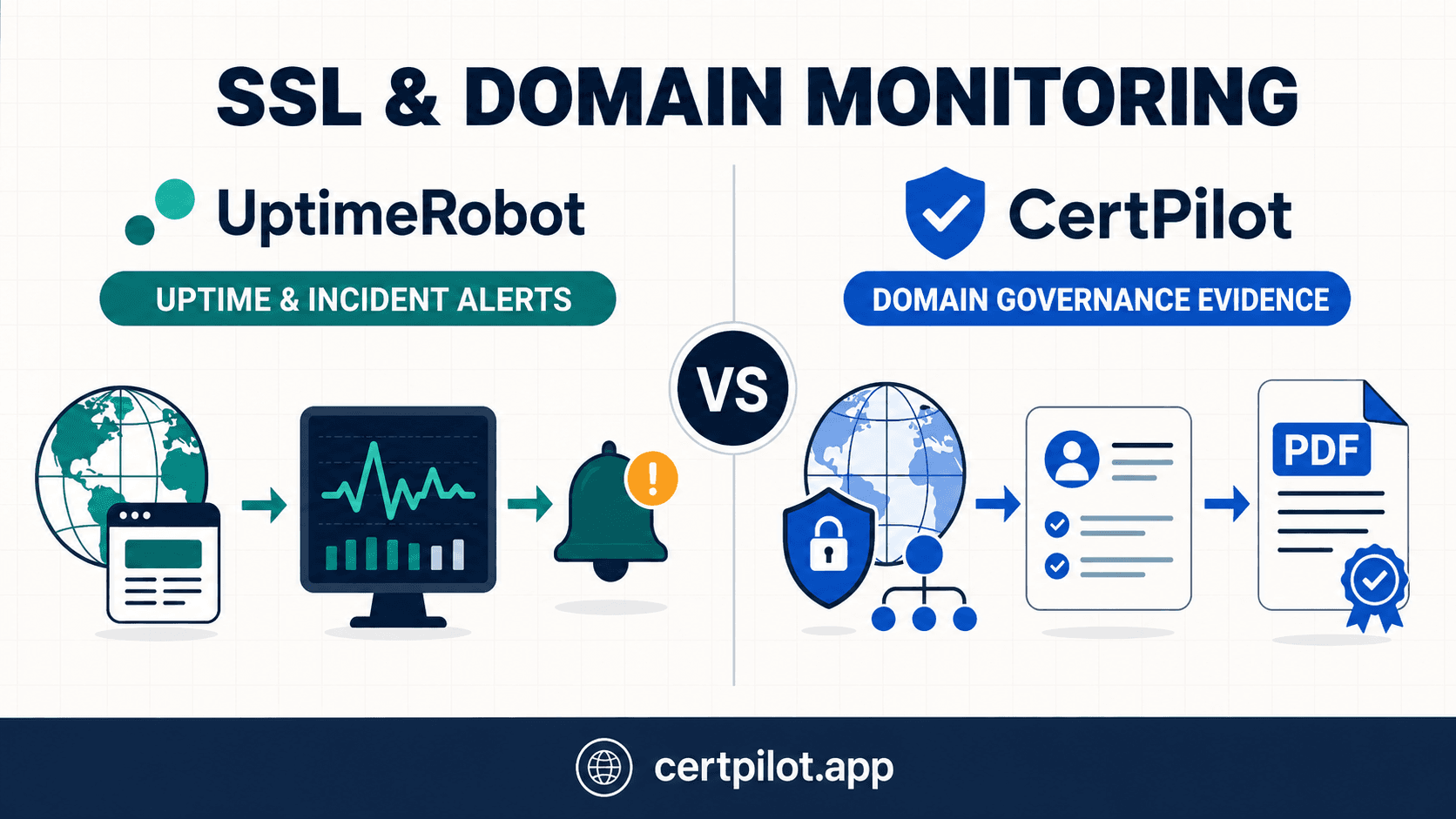
UptimeRobot vs CertPilot at a glance
- Primary job: UptimeRobot: Uptime, endpoint and incident monitoring CertPilot: IT governance evidence across external checks and manual registers
- SSL certificate checks: UptimeRobot: Paid HTTPS monitors check expiry and SSL errors CertPilot: Daily TLS check for expiry, validity and issuer
- SSL expiry cadence: UptimeRobot: Once every 24 hours CertPilot: Once daily, plus a manual per-domain run
- Website uptime: UptimeRobot: Yes; 5 minutes on Free, then 60/30/15 seconds on current paid tiers CertPilot: No
- Response-time monitoring: UptimeRobot: Yes CertPilot: No
- Domain registration expiry: UptimeRobot: Paid monitoring using WHOIS; most extensions supported CertPilot: Daily RDAP check where public data is available
- DNS monitoring: UptimeRobot: Dedicated monitors with expected-record values and broad record-type support CertPilot: Daily snapshots and drift for A, AAAA, MX, NS, TXT and CAA
- Email authentication: UptimeRobot: Not presented as a combined domain-level evidence workflow CertPilot: MX, SPF, DMARC, MTA-STS, TLS-RPT and BIMI public-record checks
- Domain owner, purpose and lifecycle: UptimeRobot: Not the product's core workflow CertPilot: Customer-maintained owner, purpose, lifecycle, renewal decision and last-reviewed date
- SSL renewal readiness: UptimeRobot: Certificate alerts CertPilot: Customer-maintained renewal method, automation status, notes and reviewed date beside the technical result
- Alerts: UptimeRobot: Strong real-time incident routing across personal channels and integrations CertPilot: Email alerts and digest for defined domain-risk events; limited outbound webhook
- Status pages: UptimeRobot: Yes CertPilot: No
- API, ping, port, keyword and cron monitoring: UptimeRobot: Yes CertPilot: No
- Evidence output: UptimeRobot: Uptime history, incidents, monthly email reports and status pages CertPilot: Six on-demand, management-ready PDF report types plus CSV exports
- Client grouping and branding: UptimeRobot: Team-oriented monitoring and white-label status pages on applicable plans CertPilot: Client/business-unit grouping and branded evidence PDFs on Professional and Portfolio
- Starting paid price shown in Europe: UptimeRobot: Solo: €10 monthly or €9/month billed annually CertPilot: Starter: €99/month
- Independent review footprint: UptimeRobot: Strong: populated G2, Capterra and Trustpilot profiles CertPilot: No comparable populated profile found as of the verification date
Are UptimeRobot and CertPilot direct alternatives?
Only for a narrow part of the job. Both can tell you that a public TLS certificate is approaching expiry and both can surface domain-registration risk. Beyond that overlap, they are aimed at different operational questions.
UptimeRobot asks:
-
Is the site, API, server or job available right now?
-
How quickly is it responding?
-
Is a required keyword or JSON value present?
-
Who should be alerted when it fails?
-
Should an incident appear on a public status page?
CertPilot asks:
-
Is the certificate valid and how much renewal runway remains?
-
When does the domain registration expire?
-
Did a public DNS record change since the last daily snapshot?
-
Are SPF, DMARC and related email-authentication records present?
-
Who owns the domain, why does it exist, and should it renew?
-
Is the certificate renewal path automated, manual, vendor-controlled or unknown?
-
Can the team produce a dated report showing what was checked and reviewed?
That difference matters when evaluating an “UptimeRobot alternative.” If you need an alternative for uptime monitoring, CertPilot is not one. If you need an alternative way to govern a portfolio of client or company domains and produce evidence, CertPilot may be the better comparison.
The core difference: incident detection versus governance evidence
An SSL alert is an event. Governance is the operating system around that event.
Imagine an agency receives a 14-day expiry warning. An uptime monitor has done its job: it detected the condition and notified the right person. But the next questions often live elsewhere:
-
Is the renewal supposed to be automatic?
-
Which hosting provider or client controls it?
-
Who is accountable for confirming renewal?
-
Is the domain still active, parked, redirecting or due for retirement?
-
Did the DNS validation path change?
-
Can the agency prove this check and review in the next client meeting?
CertPilot is built around those questions. The External Footprint module places daily public checks beside customer-maintained governance and SSL-readiness fields. Its evidence reports combine the latest check state with the records the team maintains.
UptimeRobot is built around a different loop: detect, notify, investigate, resolve, report service status. Its SSL monitoring sits inside its broader website and endpoint monitoring platform, alongside maintenance windows, response-time charts, multi-location checks, incident management and status pages.
Neither loop makes the other unnecessary. They solve different failure modes.
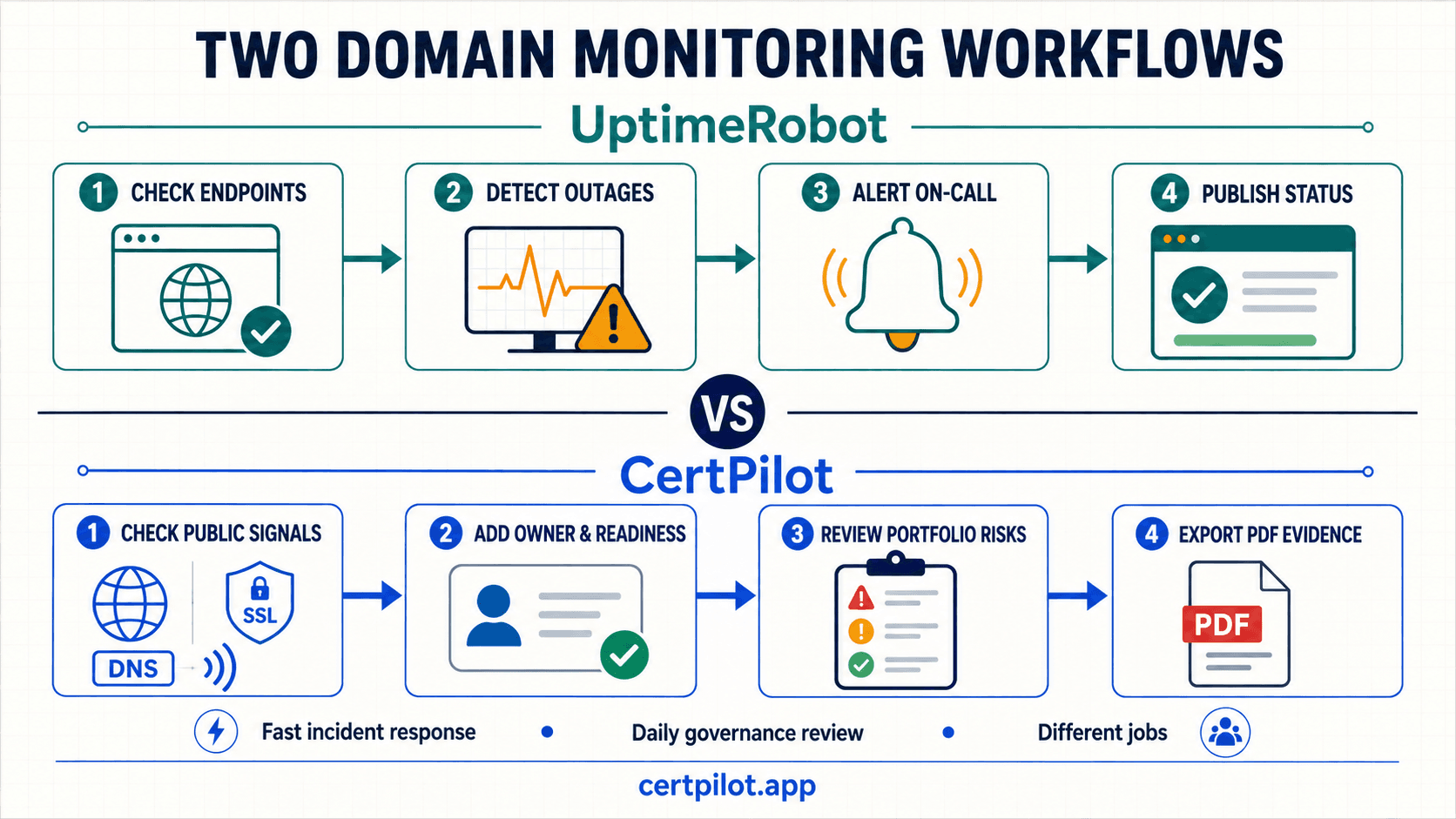
SSL certificate monitoring compared
What UptimeRobot checks
On a paid plan, entering an HTTPS URL enables SSL and domain monitoring by default. UptimeRobot checks certificate expiration once every 24 hours and detects SSL errors that prevent a secure connection. When it detects an SSL error, the monitor changes to DOWN and sends a notification. The URL must include https://; an HTTP-only monitor cannot perform the SSL check.
UptimeRobot's Help Center documents default reminders at 30, 14, 7 and 0 days before expiry, with custom reminder days available. Its marketing page instead says 30, 14, 7 and 1 day. That disagreement is small but operationally relevant, so verify the reminder configuration visible in your account rather than relying on either page alone.
The Help Center also says the first practical warning can vary by issuer: it may arrive at 14 days for some automatically renewed certificates and at 7 days for some cPanel-issued certificates. This is a reason to test your own certificate estate, not merely the default documentation.
What CertPilot checks
CertPilot connects to the public TLS service on each domain and records certificate validity, expiry and issuer. Current operational thresholds are:
-
Green: valid certificate with more than 30 days remaining.
-
Yellow: 14 to 30 days remaining.
-
Red: fewer than 14 days remaining, expired, self-signed, broken chain, hostname mismatch or TLS handshake failure.
Checks run daily across the domains in the workspace. A user can also run a check for an individual domain when validating a fix; CertPilot is not an instant bulk outage scanner.
The distinctive layer is SSL readiness. A team can record how each certificate is managed, whether renewal is automated, manual, vendor-controlled or unknown, any known renewal notes, and when the renewal path was last reviewed. Those fields are manual evidence; they do not change the technical health score.
Which SSL approach is better?
For a single production website, UptimeRobot's combined SSL-error and uptime workflow is more operationally complete. It can tell you both that TLS failed and that users cannot reach the service, then escalate through more channels.
For a portfolio owned across clients, brands or business units, CertPilot adds useful control context. A valid certificate can still be a governance risk when nobody knows whether renewal is automated or who must intervene. CertPilot is designed to expose that gap before the certificate reaches a critical window.
Both products check certificate expiry daily, so neither should be described as performing sub-minute expiry scanning. UptimeRobot's faster plan interval applies to availability monitoring, not to its once-per-24-hours certificate-expiry check.
Domain expiry monitoring: WHOIS versus RDAP
UptimeRobot reads domain-expiration dates from WHOIS records and sends default notifications at 30, 14, 7 and 0 days. The company says most domain extensions are supported, while acknowledging that some extensions may not be covered because of WHOIS server rules. Domain-expiry monitoring is available for HTTP(S) and keyword monitors on paid plans.
CertPilot queries public RDAP endpoints. RDAP is structured and modern, but coverage still depends on the registry and TLD. When a usable record is available, CertPilot records registration expiry and registrar context. When a public source does not provide enough information, the correct state is limited data rather than invented certainty.
CertPilot currently treats more than 60 days of registration runway as green, 30–60 days as yellow, and fewer than 30 days as red. It sends a one-time expiry warning when a registration enters the 45-day window, subject to its alert controls.
Neither product logs into your registrar, renews a domain or changes registration data. Keep registrar auto-renew enabled where appropriate, use a shared billing contact, protect the account with strong authentication, and monitor the payment method separately.
DNS and email-authentication coverage
UptimeRobot offers a dedicated DNS monitoring product. It supports a wider list of DNS record types and can alert when a returned value differs from an expected value. That is useful for critical records where the intended answer is known. Remember that each separate DNS monitor consumes monitor capacity, so a domain with an HTTPS monitor and several DNS monitors is not necessarily “one monitor.”
CertPilot takes one daily snapshot per domain for A, AAAA, MX, NS, TXT and CAA records, compares all six groups with the previous snapshot, and flags additions, removals or changed values. This is broad portfolio drift detection; the operator does not define an expected value for every record first. A DNS change is yellow for review, while complete resolution failure can be red.
CertPilot also checks public domain-level email-authentication signals:
-
MX
-
SPF
-
DMARC
-
MTA-STS
-
TLS-RPT
-
BIMI
This is DNS metadata only. CertPilot does not read mailboxes or message headers, process DMARC aggregate reports, test deliverability, or send email. If you need DMARC report analysis, inbox placement or forensic mail-flow investigation, use a specialist product.
The decision is therefore not “which has DNS?” Both do. The better question is whether you need real-time expected-value monitoring across a broad DNS record set or daily portfolio drift plus email-authentication and governance context.
Alerting and incident response
This is where UptimeRobot has the clearest advantage.
UptimeRobot supports email, mobile push, SMS and voice notifications, plus integrations such as Slack, Microsoft Teams, Telegram, PagerDuty, Zapier and webhooks. Recurring and prolonged notifications, maintenance windows, monitor assignment, team access and incident collaboration help an operations team route and manage outages. Status pages can communicate incidents to customers.
CertPilot's alerting is intentionally narrower. Its domain workflow currently covers:
-
a green or yellow domain becoming red;
-
a certificate entering the 30-day window;
-
a domain registration entering the 45-day window;
-
detected drift across A, AAAA, MX, NS, TXT or CAA;
-
a public check failing three consecutive times.
Email is the primary channel, with a daily digest and controls that reduce repeated messages for the same issue. A generic outbound webhook exists for selected critical events, but it is one endpoint per workspace, follows a daily delivery cycle, and has no retry queue in the current version. CertPilot does not offer UptimeRobot's native incident-routing catalogue.
If the requirement says “wake the on-call engineer within a minute,” choose UptimeRobot or another dedicated uptime/incident platform. If it says “make sure portfolio risks are reviewed and can be evidenced,” CertPilot is aligned to that job.
Reports, audit conversations and client evidence
UptimeRobot gives teams operational reporting: uptime history, response-time data, incidents, status pages and monthly email reports on paid plans. That is exactly the evidence a service owner needs to discuss availability and incident performance.
CertPilot's reports answer a different management question. It currently generates six PDF types on demand:
-
Domain Health — SSL, registration expiry, DNS state and changes, plus domain-governance and SSL-readiness context.
-
Renewal Risk — upcoming, overdue and incomplete software, hosting, licence and contract renewals.
-
Monthly Proof — a broader monthly management summary that includes domain health, renewal risk and recommended actions.
-
Weekly Governance — a weekly-format operational summary generated on demand; it is not automatically scheduled or emailed.
-
Access Review Register — current access-review state and latest completed-review evidence.
-
Governance Evidence Pack — a cross-module executive summary.
Professional and Portfolio plans add client, department or business-unit grouping plus logo and brand-colour options on evidence reports. That is useful to MSPs and agencies that need to turn invisible maintenance work into a dated client deliverable.
Evidence boundary: A CertPilot PDF is an operational record built from public checks and customer-maintained registers. It is not raw packet evidence, a ticketing system, a forensic chain of custody, a security audit, a compliance certification or a legal guarantee.
Pricing: the difference is substantial, but the units are not equivalent
UptimeRobot is much cheaper if your requirement is uptime plus SSL/domain alerts. CertPilot costs more because the paid workspace includes domain, DNS and email-auth checks, all governance registers and all evidence-report types.
Current public prices
- UptimeRobot Free: €0; 50 basic monitors. Detailed documentation says SSL/domain checks are paid, so treat the free plan as a basic monitoring entry point, not the entitlement source for certificate governance.
- UptimeRobot Solo: €10 month-to-month or €9/month billed annually; 10 monitors; €108/year on annual billing.
- UptimeRobot Team: €41 month-to-month or €35/month billed annually; 100 monitors; €420/year on annual billing.
- UptimeRobot Scale: €77 month-to-month or €65/month billed annually; 200 monitors at the displayed tier; €780/year on annual billing.
- CertPilot Starter: €99/month; up to 100 monitored domains; €1,188/year at the monthly price.
- CertPilot Professional: €199/month; up to 250 monitored domains plus grouping and branded PDFs; €2,388/year at the monthly price.
- CertPilot Portfolio: €299/month; up to 500 monitored domains; €3,588/year at the monthly price.
Prices above are the Europe-localised figures displayed during research. UptimeRobot says annual billing saves about 15%; its prices can vary by region and currency. CertPilot's public page currently lists monthly prices and a 14-day, no-card trial. UptimeRobot offers a free plan and a 14-day money-back period on paid plans rather than the same trial model.
What the difference looks like
At the displayed 100-unit tier, UptimeRobot Team costs €420/year on annual billing while CertPilot Starter costs €1,188/year at the published monthly rate — a difference of €768/year. CertPilot is about 2.8 times the annual cost in that simplified comparison.
At the 200/250 tier, UptimeRobot Scale is €780/year and CertPilot Professional is €2,388/year, a difference of €1,608/year.
Those are not like-for-like capacity comparisons:
-
UptimeRobot counts monitors. A website check, DNS record check, API check, ping or port check can each consume capacity.
-
CertPilot counts monitored domains for its automated external checks. Starter also includes the renewal, people/accounts, asset and access-review registers and all six report types.
-
UptimeRobot includes uptime and incident tooling that CertPilot does not.
-
CertPilot includes governance metadata and management-ready evidence that UptimeRobot is not positioned to replace.
For ten public sites where the only need is uptime and certificate expiry, UptimeRobot Solo is the rational budget choice. For 100 client domains that need named ownership, renewal-path review, DNS/email-auth visibility and a recurring evidence deliverable, compare CertPilot's €99 workspace price with the cost of both monitoring and the separate manual reporting process it replaces.
For a no-cost first step, CertPilot also offers Watchtower for visibility into SSL expiry across up to 25 domains with a calendar feed, plus a free 10-domain audit. These are not substitutes for UptimeRobot's ongoing outage monitoring.
A note on UptimeRobot's Free-plan wording
UptimeRobot's current Help Center states that the SSL toggle is unavailable on Free and that domain-expiry monitoring is a paid feature. Its detailed pricing comparison also says SSL monitoring is included only in paid plans. The extracted Free-plan card on the same pricing page displays SSL, domain and DNS feature labels without making their visual state clear in plain text. We therefore used the Help Center and detailed comparison as the entitlement source. Confirm the controls available in your own dashboard before relying on a free account for certificate monitoring.
What G2, Capterra and Trustpilot reviews say
UptimeRobot has a major advantage in independent social proof. CertPilot is newer and did not have a comparable populated profile on the three review platforms when this page was checked.
- G2: UptimeRobot reviews showed 4.7/5 from 303 reviews when checked. Repeated themes: easy setup, reliable monitoring and useful notifications; some users mention paid-feature limits, alert noise, UI limitations and price.
- Capterra: UptimeRobot listing showed 4.8/5 from 75 reviews and a page update date of 21 July 2026. Repeated themes: strong ease of use and value; some reports of momentary timeout alerts, occasional false positives, SMS cost and changing Free-plan policies.
- Trustpilot: UptimeRobot reviews showed 4.7/5 from 471 reviews, with 86% five-star and 6% one-star. Repeated themes: straightforward setup, dashboard clarity and prompt alerts; a minority mention false alerts, account/billing friction or feature changes.
Review scores are snapshots, not product guarantees. They also measure the full UptimeRobot experience, not SSL monitoring in isolation. On Trustpilot, the company invites reviews, and at least one visible review disclosed an incentive; this does not invalidate the overall profile, but it is a reason to read a representative mix rather than the headline score alone.
For CertPilot, searches by product and brand name did not find an established, populated G2, Capterra or Trustpilot product profile. An unrated Capterra mention surfaced with pricing and categorisation that do not match CertPilot's current public site, so it was not used. If proven customer sentiment is a buying requirement today, UptimeRobot wins this criterion clearly.
Product boundaries you should not miss
CertPilot does not monitor uptime, availability, response time, APIs, page keywords, ping, ports, cron jobs or multi-location reachability. It does not publish status pages. It also does not issue, install, renew or rotate certificates; log into registrars; change DNS; scan for vulnerabilities; or certify compliance.
UptimeRobot should not be treated as a replacement for domain ownership, lifecycle and renewal-decision records, SSL-readiness reviews, broader manual IT registers, or CertPilot's combined governance-evidence PDFs. Its operational reports and status pages are valuable, but they prove a different kind of work.
Both products depend on public network and registry data for the overlap considered here. A firewall, unsupported TLD, transient resolver condition or third-party data limitation can affect results. Human review remains necessary.
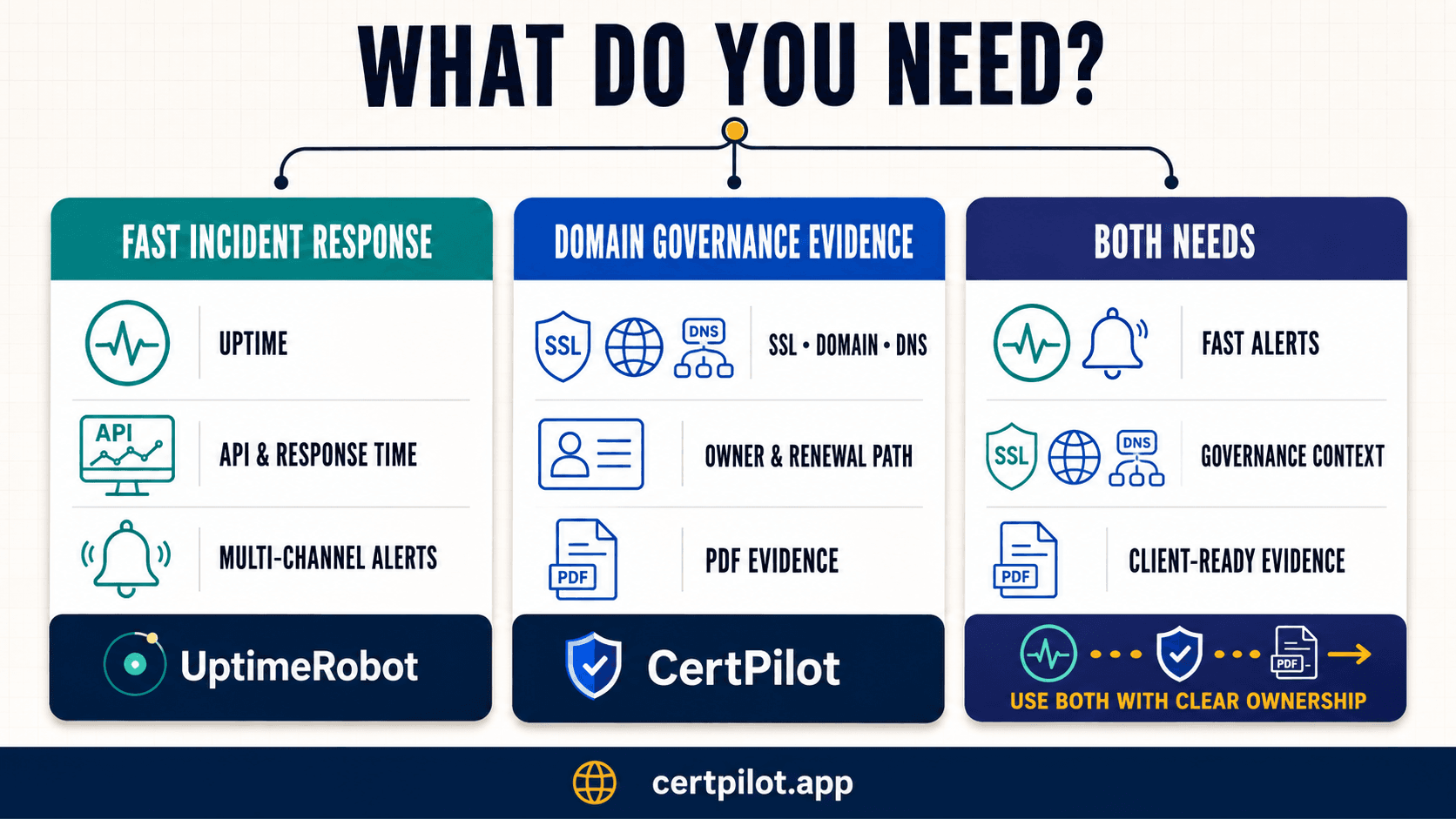
Choose UptimeRobot if…
UptimeRobot is the better choice when most of these statements are true:
-
Website or API availability is the primary risk.
-
You need detection in seconds or minutes, not a daily governance check.
-
Response time, keyword, JSON, port, ping or heartbeat checks matter.
-
Alerts must reach Slack, Teams, PagerDuty, SMS, voice or mobile push.
-
You need maintenance windows, incident collaboration or public status pages.
-
An API or CLI is important for provisioning and monitor management.
-
You want a proven product with hundreds of independent reviews.
-
Your budget for ten to 100 monitors is closer to €9–€35 per month on annual billing than €99 per month.
Do not pay for CertPilot solely to replace these capabilities; it does not provide them.
Choose CertPilot if…
CertPilot is the better choice when most of these statements are true:
-
Your unit of work is a portfolio of domains rather than a set of endpoints.
-
SSL expiry needs to sit beside domain registration, DNS drift and email authentication.
-
Missing ownership and unknown renewal methods are as risky as technical failures.
-
You manage domains across clients, brands, departments or business units.
-
Managers or clients ask for a dated PDF, not another dashboard login.
-
You also maintain vendor renewals, people/accounts, asset or access-review registers.
-
CSV portability and a manual-first workflow are acceptable.
-
Daily checking is appropriate; real-time outage response is handled elsewhere.
Do not choose CertPilot if a daily public check is too slow for your incident-response requirement.
Use both if…
Using both is sensible when the same team owns service availability and governance evidence.
A clean division of labour is:
-
UptimeRobot: HTTPS/API/keyword/port/heartbeat monitors, fast failure alerts, incident handling and customer-facing status.
-
CertPilot: daily TLS, RDAP, DNS and email-auth checks; owners and lifecycle decisions; SSL-renewal readiness; client grouping; evidence PDFs.
Avoid duplicate alert fatigue by assigning different purposes. Let UptimeRobot page the operator for incidents. Let CertPilot surface portfolio review tasks and feed the monthly or quarterly governance conversation. Record the UptimeRobot service itself in CertPilot's Renewals & Vendor Register if subscription ownership, renewal date or billing context needs to be governed.
A practical 14-day evaluation plan
Do not compare dashboards with an empty account. Use a controlled sample of 10–20 domains that represents your real edge cases.
1. Build a representative test set
Include:
-
a primary production site;
-
an API or status endpoint;
-
an automatically renewed certificate;
-
a vendor-managed or manually renewed certificate;
-
a certificate already inside a 30-day warning window, if available;
-
a parked or redirect-only domain;
-
a domain with an unclear internal owner;
-
a domain under a less common TLD;
-
a domain that sends email and has SPF/DMARC records;
-
one client or business-unit grouping.
Use an approved staging endpoint for deliberate SSL or content failures. Do not break a production certificate to test an alert.
2. Configure UptimeRobot for the incident job
Create HTTPS monitors for the public sites, then add only the endpoint, keyword, port, heartbeat or DNS monitors that represent genuine response duties. Confirm SSL and domain-expiry toggles, custom reminder days, monitoring locations, maintenance windows and alert recipients. Route one test notification through the same channel the on-call team would actually use.
Measure:
-
time to create monitors;
-
time to detect a controlled failure;
-
clarity of the DOWN reason;
-
notification speed and routing;
-
noise from transient failures;
-
incident history and status-page usefulness;
-
monitor slots consumed per domain.
3. Configure CertPilot for the governance job
Import the same domains, run the initial checks, and complete owner, purpose, lifecycle, renewal decision and last-reviewed data. Record each certificate's management method and automation state. Where relevant, add email sending sources and review the SPF, DMARC, MTA-STS, TLS-RPT and BIMI results.
Measure:
-
time to identify missing owners and unknown renewal paths;
-
usefulness of DNS drift and email-auth context;
-
handling of limited RDAP data;
-
clarity of priorities across the portfolio;
-
quality of the Domain Health PDF for a manager or client;
-
time saved compared with building the report manually.
4. Run two tabletop exercises
Scenario A: the site fails now. Can the tool detect it, suppress maintenance noise, reach the right person and communicate status? UptimeRobot should win this exercise; if it does not, inspect the monitor and routing configuration.
Scenario B: the certificate has 20 days left and nobody knows who controls renewal. Can the tool identify technical risk, ownership, renewal method, client context and a dated management artifact? CertPilot should win this exercise; if it does not, inspect the completeness of the manual governance fields.
5. Decide using outcomes, not feature count
Choose UptimeRobot if the operational incident loop produced most of the value. Choose CertPilot if portfolio review and evidence eliminated a real spreadsheet/reporting burden. Keep both if the tests exposed two distinct responsibilities. Choose a different category altogether if you need automated certificate lifecycle management, private-network probing, vulnerability scanning or enterprise GRC workflows.
Questions to ask before buying either product
Ask UptimeRobot:
-
Does my chosen plan include SSL, domain and DNS monitoring in my region?
-
How many monitor slots will the real configuration consume?
-
Which expiry reminder schedule is actually active in my account?
-
Which alert integrations, users, SMS/voice credits and retention period are included?
-
How are false positives confirmed across locations?
-
Which reports or exports can I retain for client or audit conversations?
Ask CertPilot:
-
Is daily checking sufficient for every domain in scope?
-
Who will own the human-maintained governance and SSL-readiness fields?
-
Is Starter enough, or do we need client grouping and branded reports?
-
How should limited RDAP data be reviewed for unsupported TLDs?
-
Which events can reach the current webhook, and is daily delivery acceptable?
-
Will the Domain Health report satisfy the actual stakeholder asking for evidence?
Bottom line
UptimeRobot is the stronger product for uptime and incident monitoring, the cheaper option for basic SSL/domain alerts, and the more proven choice by independent review volume. Its paid HTTPS monitor combines availability, SSL-error detection and domain-expiry monitoring, while its broader platform adds response time, multiple monitor types, integrations, incidents and status pages.
CertPilot is the stronger product when SSL monitoring is one part of a domain-governance and evidence workflow. Daily TLS, RDAP, DNS and email-auth checks sit beside owners, lifecycle and renewal-readiness data, then feed a dated report that a manager, client or auditor can read.
If you only need to know that a site is down or a certificate is expiring, start with UptimeRobot. If you need to prove that a portfolio is owned, reviewed and under deliberate control, start a 14-day CertPilot trial or test the free 10-domain audit. If you need both outcomes, use both products with clearly separated alert and reporting responsibilities.
Sources and verification notes
Product capabilities, prices and review counts change. The claims on this page were last checked on 21 August 2026 against:
Frequently Asked Questions
Is CertPilot a direct UptimeRobot alternative?
Not for uptime monitoring. UptimeRobot is designed to check website and endpoint availability at short intervals, measure response time, manage incidents, route alerts and publish status pages. CertPilot deliberately does none of those things. The products overlap on daily public SSL and domain-expiry checks, but CertPilot extends that overlap into DNS drift, email-authentication signals, customer-maintained domain ownership and SSL-readiness records, and on-demand evidence PDFs. Treat CertPilot as an alternative only when your real search is for a domain-governance and reporting workflow, not when you need to replace UptimeRobot's outage detection. For an MSP or agency responsible for both jobs, the products can be complementary.
Does CertPilot monitor website uptime or response time?
No. CertPilot does not probe website availability, calculate uptime percentages, measure response time, test page keywords, monitor APIs, ping hosts, watch ports or verify cron heartbeats. Its automated external-footprint checks run daily against public TLS, RDAP and DNS signals. That cadence is appropriate for certificate-expiry, domain-registration, DNS-drift and email-authentication review, but it is not appropriate for time-sensitive incident response. Use UptimeRobot or another dedicated uptime platform for rapid availability detection. CertPilot can then hold the governance context around the same domain and produce management-ready evidence from the latest public checks and your team's records.
Which is cheaper: UptimeRobot or CertPilot?
UptimeRobot is considerably cheaper for pure uptime and SSL/domain alerting. Current Europe-localised annual prices start at €108/year for 10 Solo monitors and €420/year for 100 Team monitors. CertPilot Starter is €99/month, or €1,188 at the published monthly rate, for up to 100 monitored domains plus all registers and evidence reports. The units are not equivalent: UptimeRobot counts individual monitors, while CertPilot counts domains and includes domain, DNS, email-authentication, renewal, people/accounts, asset and access-review workflows. Compare the full configuration and the reporting work replaced, not only the headline capacity. Teams needing only ten uptime/SSL checks should normally choose UptimeRobot on price.
Which product is better for SSL certificate expiry monitoring?
For operational website monitoring, UptimeRobot is usually better because SSL-error detection sits beside fast uptime checks, response-time data, multiple notification channels and incident tooling. Its expiry check runs once every 24 hours and supports custom reminder days on paid plans. For portfolio governance, CertPilot is usually better because the daily certificate result sits beside domain ownership, lifecycle, renewal decision, certificate-management method, automation status and review notes. CertPilot also rolls the data into Domain Health evidence. Neither product renews certificates, and neither performs sub-minute expiry scanning. Choose according to the action required after the warning: incident response favours UptimeRobot; governance review and stakeholder evidence favour CertPilot.
Can either UptimeRobot or CertPilot renew an SSL certificate or domain?
No. Both products monitor public signals; neither should be treated as a registrar or certificate-lifecycle automation platform. UptimeRobot can warn about SSL errors and upcoming certificate or domain expiration. CertPilot can warn about the same broad risks, record how a certificate is supposed to renew, and show who owns the domain and what decision was made. It does not issue, install, rotate or renew certificates, log in to registrars, change nameservers or update DNS. Keep auto-renew configured at the certificate or hosting provider where appropriate, protect registrar access, maintain a valid payment method and accountable billing contact, and test the actual renewal path before a critical date.
What do G2, Capterra and Trustpilot reviews say about UptimeRobot?
The review footprint is strongly positive overall. At the time of checking, G2 showed 4.7/5 from 303 reviews, Capterra showed 4.8/5 from 75 reviews, and Trustpilot showed 4.7/5 from 471 reviews. Recurring positives include easy setup, a clear dashboard, reliable uptime checks, quick notifications and good value. Recurring cautions include Free-plan or paid-feature limits, occasional timeout or false-positive alerts, notification noise, SMS cost, UI friction and policy changes. These reviews cover UptimeRobot as a whole rather than SSL monitoring alone. CertPilot did not have a comparable populated profile on these three platforms, so buyers prioritising established public customer evidence should give UptimeRobot the advantage.
Can an MSP or agency use UptimeRobot and CertPilot together?
Yes, and the combination can be cleaner than forcing either product to do the other's job. Use UptimeRobot for rapid HTTPS, API, keyword, port or heartbeat checks, on-call notifications, incident records and public status communication. Use CertPilot for daily TLS, domain-registration, DNS and email-authentication checks; domain owners and lifecycle decisions; SSL-renewal readiness; client grouping; and dated evidence reports. Assign different alert responsibilities to avoid duplicate noise: operational failures go to the incident channel, while governance findings go to the portfolio review queue. During client reviews, present UptimeRobot's availability history alongside CertPilot's Domain Health or Monthly Proof report to show both service performance and control ownership.