If you use Google Sheets as a renewal tracker, asset list, systems catalog, access-review matrix, and monthly IT report, CertPilot is a purpose-built alternative for the governance work around those sheets.
It does not replace Google Sheets for formulas, charts, flexible analysis, or quick one-off lists. It replaces the fragile operating layer: manually checking public technical signals, maintaining several unrelated registers, proving that reviews happened, and rebuilding management reports by hand.
The practical distinction is simple:
-
Google Sheets stores and analyzes whatever you design.
-
CertPilot runs defined public checks, provides structured IT registers, and turns the results into dated evidence reports.
If you only need a flexible list, keep the spreadsheet. If leadership regularly asks who owns each system, what is renewing, who has access, what changed, and whether the work was reviewed, a purpose-built evidence platform is easier to operate.

In short
-
Google Sheets is the better tool for ad hoc calculations, custom layouts, collaboration, cleanup, and early-stage lists.
-
CertPilot is the better fit when the same records must drive review queues, reminders, public-signal checks, and repeatable PDF evidence.
-
Google Sheets has genuine version history and protected ranges. The limitation is not that it lacks useful controls; it is that you must design and maintain the entire governance workflow yourself.
-
CertPilot's internal registers are manual-first and CSV-friendly. It does not connect to Google Workspace or Microsoft 365, discover SaaS automatically, or scan devices.
-
You do not need an all-or-nothing migration. Use spreadsheets for intake and analysis, then use CertPilot as the maintained governance and evidence layer.
Is CertPilot really a Google Sheets alternative?
For general spreadsheet work, no. CertPilot is not a spreadsheet application and should not be compared with Google Sheets, Excel, Airtable, or database tools on formula depth, charting, or blank-canvas flexibility.
For IT governance evidence, yes. CertPilot covers a specific collection of jobs that lean IT teams often assemble in Google Sheets:
-
domain ownership and lifecycle tracking;
-
SSL, DNS, domain-expiry, and email-authentication checks;
-
renewals and vendor decisions;
-
people and system-account records;
-
hardware and software ownership;
-
systems catalog and access reviews;
-
vendor status watchlists;
-
dated reports for management, clients, or review conversations.
Google Sheets can hold most of those records. What it does not provide out of the box is the complete operating model around them: checks + maintained registers → evidence reports.
That narrower comparison is the purpose of this page.
CertPilot vs Google Sheets: side-by-side comparison
Comparison at a glance
- Build custom formulas, pivots, and charts — Google Sheets: native and highly flexible. CertPilot: not a spreadsheet or BI tool. Better fit: Google Sheets.
- Start a quick one-off list — Google Sheets: open a blank sheet and define any columns. CertPilot: uses purpose-built modules and fields. Better fit: Google Sheets.
- Collaborate on an early data-cleanup exercise — Google Sheets: strong real-time editing, comments, filters, and filter views. CertPilot: better used after the team agrees on the operating record. Better fit: Google Sheets.
- Review who changed a cell — Google Sheets: version history and cell edit history are available. CertPilot: module-specific records and review events, not a general cell history. Better fit: Google Sheets.
- Import or export CSV data — Google Sheets can import and export CSV. CertPilot supports CSV import/export across the relevant manual registers. Better fit: both.
- Maintain IT governance registers — Google Sheets requires you to design tabs, columns, validation, formulas, views, and review rules. CertPilot provides structured registers for renewals, people/accounts, assets, systems, and access reviews. Better fit: CertPilot.
- Check SSL, DNS, domain expiry, and email authentication daily — Google Sheets requires separate tools, scripts, add-ons, or manual work. CertPilot runs automated daily checks of public technical signals. Better fit: CertPilot.
- Detect and document DNS changes — Google Sheets requires a custom snapshot and comparison process. CertPilot includes public DNS snapshots and change evidence in the monitoring model. Better fit: CertPilot.
- Keep renewal decisions visible — Google Sheets needs custom fields, formulas, calendar habits, or scripts. CertPilot tracks renewal dates, notice deadlines, owners, decisions, review dates, alerts, and report input. Better fit: CertPilot.
- Record completion of an access review — Google Sheets can do this if you design and protect the completion process. CertPilot has an access-review workflow with a completion log and a dedicated PDF report. Better fit: CertPilot.
- Watch official public vendor status signals — Google Sheets requires separate links, feeds, scripts, or manual checking. CertPilot has a watchlist built from cached official public vendor status feeds. Better fit: CertPilot.
- Produce a repeatable management PDF — Google Sheets requires a manually designed report, print range, or separate document. CertPilot currently has six on-demand evidence report formats. Better fit: CertPilot.
- Connect to Google Workspace or Microsoft 365 admin data — Google Sheets can be extended by the customer with scripts and APIs. CertPilot has no connector live today. Better fit: neither out of the box in CertPilot.
- Discover SaaS, accounts, or devices automatically — neither a normal Google Sheet nor CertPilot does this natively. CertPilot registers are customer-maintained. Better fit: neither.
- Configure, patch, lock, or wipe devices — neither tool is an MDM tool. Better fit: neither.
- Certify compliance or guarantee an audit result — neither tool does this. Better fit: neither.
Google documents that Sheets supports version history and cell edit history, protected sheets and ranges, and filters and filter views. Those are real strengths. A fair comparison should acknowledge them.
The difference is that spreadsheet controls operate on a file. CertPilot's workflows operate on IT governance objects—domains, renewals, people, accounts, assets, systems, access decisions, checks, and reports.
Where Google Sheets works well
Google Sheets is often the correct first tool. It is familiar, quick to share, and flexible enough to help a team discover what it should be tracking before it commits to a system.
Stay in Google Sheets when most of these statements are true:
-
One person owns the file and updates it consistently.
-
The list is small enough to review manually without missing items.
-
You need custom calculations or analysis more than a prescribed workflow.
-
The sheet is temporary intake, cleanup, or migration work.
-
Management does not require a recurring, self-contained evidence report.
-
Public checks such as SSL, DNS, and domain expiry are handled reliably elsewhere.
-
Access reviews and renewal decisions are infrequent and do not need a formal completion record.
-
The person who built the sheet will remain available to explain its formulas, colors, tabs, and exceptions.
A well-run spreadsheet is better than an abandoned platform. Moving tools does not fix unclear ownership or records nobody reviews.
Where Google Sheets starts becoming operationally expensive
The spreadsheet usually becomes a problem before it becomes technically large. A workbook with only 100 rows can still be fragile if those rows represent critical renewals, unassigned laptops, former employees' accounts, or domains nobody clearly owns.
1. The structure exists only because someone remembers it
A column named Status can mean active, reviewed, paid, healthy, or complete. A red cell can mean urgent—or merely that somebody preferred red formatting.
Google Sheets supports data validation, protected ranges, named versions, and formulas. But the team still has to define what each field means, which values are allowed, who updates them, and when a row is considered reviewed.
A purpose-built register starts with the object and its operating questions. A renewal record separates renewal date from notice deadline and decision status. An access-review record separates current access from follow-up action and completion. An asset record separates owner, custodian, location, and lifecycle state.
2. Version history is not the same as a completed review
Google Sheets has useful version history, including named versions and cell edit history. That can show that something changed and, in many cases, who changed it.
It does not automatically establish that a defined quarterly access review was completed, what period it covered, who reviewed it, what follow-up remained, and when the next review is due. You can build that process in a spreadsheet, but the process is yours to design and enforce.
CertPilot's access-review workflow records completed review events separately from the working matrix. This distinction matters because a changing table shows current state; a completion record shows that a review ritual happened.
3. Public technical checks live outside the workbook
A spreadsheet can store a certificate-expiry date or DNS value. It does not natively open a TLS connection, query RDAP, compare DNS snapshots, or evaluate public email-authentication records every day.
You can add scripts and external data sources. That may be entirely reasonable for a technical team. It also means somebody owns authentication, error handling, quotas, scheduling, parsing, false positives, and maintenance whenever an upstream format changes.
CertPilot runs defined checks against public SSL/TLS, DNS, RDAP/domain-registration, email-authentication, and official vendor-status sources. Its methodology explains what those checks read and where their boundaries are.
4. The management report becomes a second system
The operational sheet is usually too detailed for leadership. That leads to a separate slide, document, PDF, email summary, or dashboard.
Now the team maintains two things:
-
the source spreadsheet; and
-
the management artifact assembled from it.
Every reporting cycle creates the same questions: Which tabs are in scope? When was the data last reviewed? Which findings are new? What should management decide? Can the recipient understand the report without access to the original workbook?
CertPilot's evidence reports are generated on demand from the latest checks and maintained registers. The sample reports gallery shows the output format before you migrate anything.
5. Several good spreadsheets still create one bad operating picture
Many teams do not have one overloaded spreadsheet. They have several individually sensible ones:
-
a domain list;
-
a renewal calendar;
-
an employee and account matrix;
-
a laptop inventory;
-
an access-review workbook;
-
a vendor list;
-
a monthly IT report.
The weakness appears between them. The owner has left in the people sheet but remains assigned in the assets sheet. A SaaS tool exists in the access matrix but not in the renewal tracker. A domain is technically healthy but has no known business owner or renewal decision.
CertPilot does not magically reconcile every record or discover missing systems. Its value is more modest and more practical: it gives those governance records a consistent home and rolls their current state into defined evidence outputs.
What CertPilot adds to the workflow
CertPilot is built around three layers.
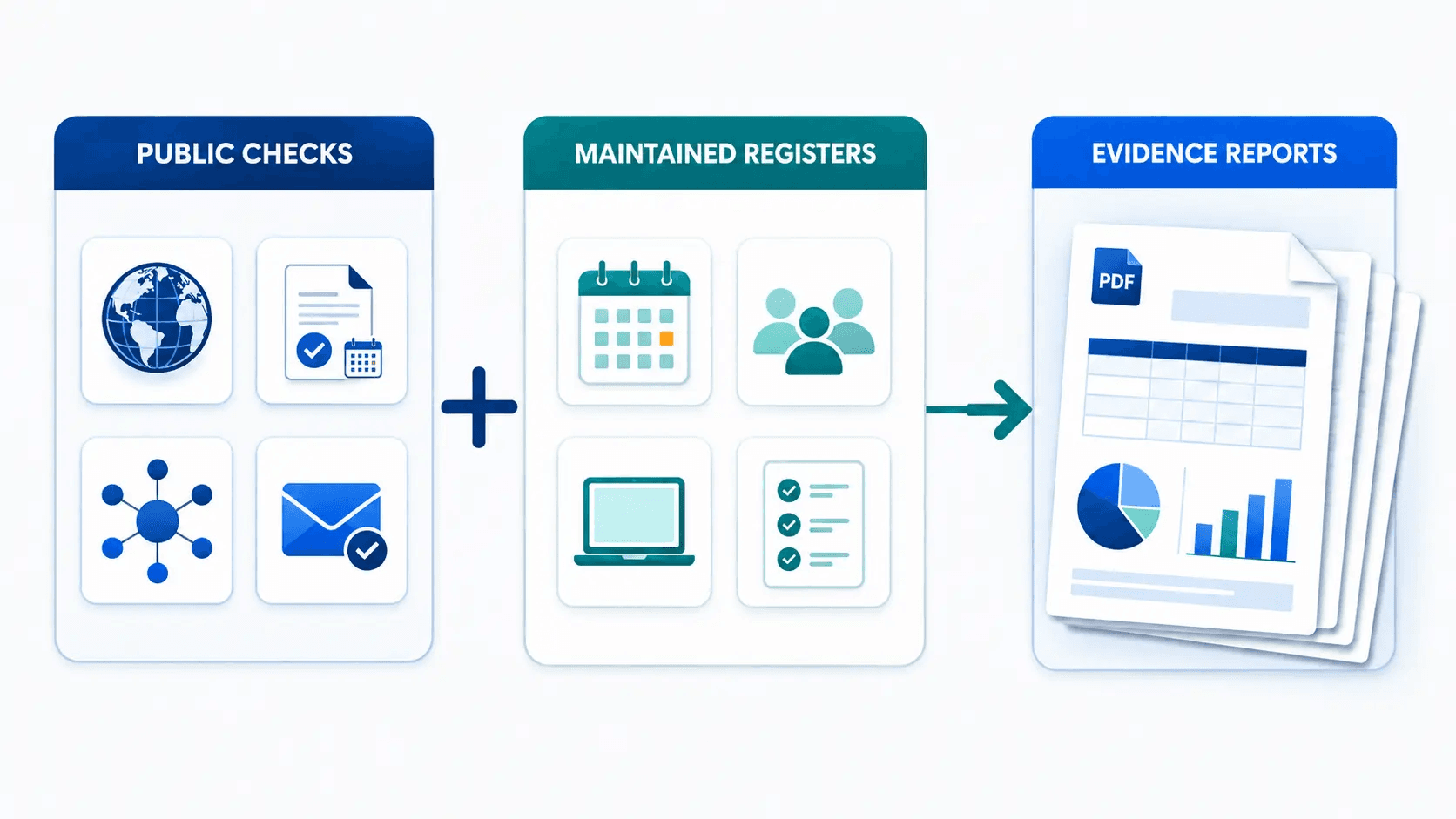
Automated public-signal checks
Daily checks cover information that can be verified without access to private accounts:
-
SSL/TLS certificate validity and expiry;
-
public DNS records and changes;
-
RDAP/domain registration status and expiry where available;
-
domain-level email-authentication records;
-
official public vendor status feeds.
These checks do not scan websites for vulnerabilities, read mailbox content, test uptime, or log in to registrar and DNS-provider accounts.
Customer-maintained registers
Registers hold information only the organization can authoritatively provide:
-
domain owners, purpose, lifecycle, and renewal decisions;
-
renewals, vendors, costs, notice deadlines, owners, and decisions;
-
people and the system accounts they hold;
-
hardware and software assets, assignments, locations, and lifecycle state;
-
systems, owners, criticality, support, recovery context, and review dates;
-
access-review entries, decisions, follow-up, and completion events;
-
known email-sending sources for monitored domains.
The registers are manual-first. Records are entered by the team or imported from CSV; there is no Google Workspace, Microsoft 365, HRIS, identity-provider, MDM, or SaaS-discovery connector today.
Management-ready evidence reports
CertPilot currently produces six on-demand PDF report formats:
-
Domain Health — public domain, SSL, DNS, expiry, DNS-change, and domain-governance evidence.
-
Renewal Risk — overdue and upcoming renewals with ownership and decision context.
-
Monthly Proof — a recurring management summary built from current checks and selected register summaries.
-
Weekly Governance — a weekly-format operational snapshot generated when needed; it is not automatically emailed.
-
Access Review Register — current access-review state plus the latest completed-review evidence.
-
Governance Evidence Pack — a cross-module executive summary; people/accounts, assets, and vendor status appear as summary counts rather than detailed standalone reports.
The reports organize operational evidence. They are not compliance certificates, security audits, legal advice, or guarantees that an auditor will accept a specific item.
Should you switch? Use this eight-question test
Answer yes or no:
-
Do you maintain the same IT subject across two or more sheets or tabs?
-
Do you manually check domains, SSL, DNS, or email-authentication records before reporting?
-
Do important rows lack a named owner, last-reviewed date, or next decision?
-
Are access reviews recorded by overwriting the current matrix rather than logging completion?
-
Does preparing a management or client update require copying information into another document?
-
Would another administrator struggle to understand the workbook without the person who created it?
-
Have reminders, formulas, scripts, or conditional formatting become a system somebody must maintain?
-
Do stakeholders need a dated PDF rather than access to a live workbook?
0–2 yes answers: Google Sheets is probably still sufficient. Improve the sheet before buying another tool.
3–4 yes answers: A hybrid workflow is likely useful. Keep Sheets for cleanup and analysis, but move the recurring governance record and reports into a structured platform.
5–8 yes answers: The spreadsheet is doing the job of an application. A purpose-built register-and-evidence workflow is likely easier to sustain.
This is a practical heuristic, not an industry benchmark. The severity of each item matters more than the score. One unknown owner on a critical domain may justify action sooner than 500 clean, low-impact asset rows.
How to move from Google Sheets to CertPilot without creating a migration project
Do not migrate every cell. Migrate the records that answer real operating questions.
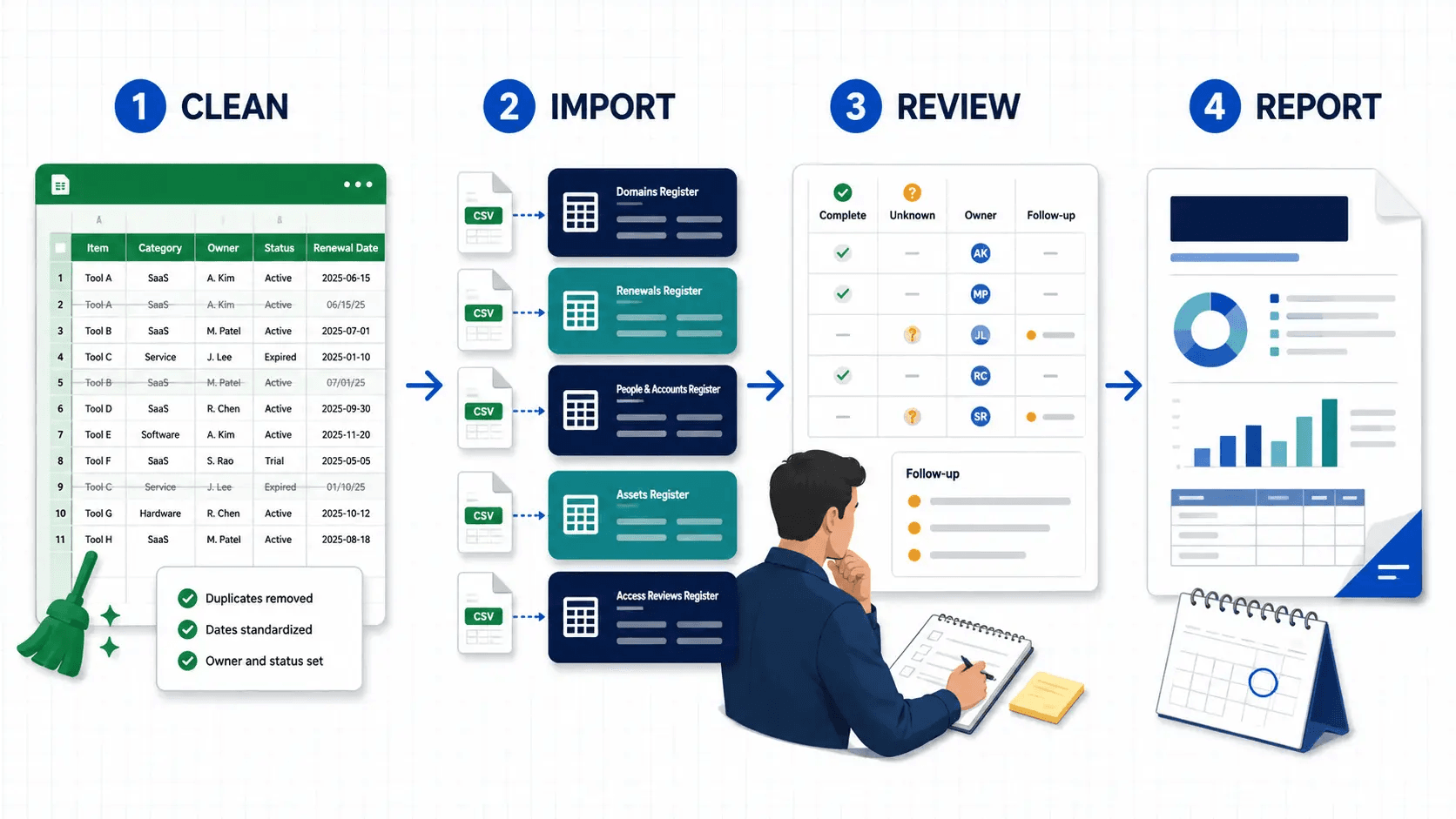
Step 1: Freeze and label the source
Create a named version or dated copy of each workbook before cleanup. Record:
-
workbook owner;
-
date of the snapshot;
-
tabs in scope;
-
known gaps;
-
who can confirm ambiguous records.
Google Sheets supports named versions, but Google currently limits how many named versions a spreadsheet can hold. Treat the named version as a migration checkpoint, not your only archive.
Step 2: Split data by governance object
Do not import a single master sheet containing domains, laptops, vendors, people, and notes. Separate the records by the job they serve.
Module-by-module migration map
- Domains and websites → External Footprint + Domain Governance. Clean domain, owner, purpose, lifecycle status, renewal decision, and last-reviewed date first.
- SaaS, hosting, licenses, and contracts → Renewals & Vendor Register. Clean vendor, asset or subscription name, owner, renewal date, notice deadline, auto-renew state, decision, and last-reviewed date first.
- Employees, contractors, and accounts → People & Accounts. Clean person, work email or identifier, role or department, system, and account status first.
- Laptops, devices, software, and licenses → Assets Register. Clean asset name or ID, type, owner or custodian, location, lifecycle status, and serial/service tag where appropriate.
- Systems and access matrix → Systems Catalog + Access Reviews. Clean system, owner, review cadence, person, access level, review status, and follow-up action first.
- Critical external vendors → Vendor Status Watch. Select supported vendors your workspace depends on; do not assume provider-reported incidents prove tenant-specific impact.
Do not import passwords, API keys, full software-license keys, private contract content, or unnecessary personal data into general notes.
Step 3: Remove spreadsheet-only artifacts
Before export:
-
remove merged cells;
-
use one record per row;
-
standardize dates;
-
replace color-only meanings with explicit status values;
-
separate owner from free-form notes;
-
mark unknown values as unknown instead of guessing;
-
deduplicate vendors, systems, people, and asset identifiers;
-
archive stale rows rather than silently deleting evidence you may need to reconcile.
Step 4: Export and import one module at a time
Google Sheets can export a single sheet as CSV. Start with the cleanest, highest-value module—not the largest one.
A sensible order for many lean IT teams is:
-
domains and domain-governance context;
-
renewals and vendors;
-
people and accounts;
-
systems and access reviews;
-
hardware and software assets.
Import a small sample first. Check dates, owners, statuses, and special characters before importing the complete file.
Step 5: Reconcile, do not merely import
After each import, ask:
-
Is every active record owned?
-
Are unknown values visible?
-
Are former employees and retired assets marked correctly?
-
Are renewal date and notice deadline separate?
-
Does every access-review entry map to a real system?
-
Can a new administrator understand the record without the old spreadsheet legend?
An import preserves data. Reconciliation makes the data trustworthy.
Step 6: Generate a baseline report
Create the first evidence report after the initial cleanup and record the date as the baseline. Do not wait for perfect data.
The report should make missing ownership, incomplete records, overdue reviews, and unresolved decisions visible. Those gaps become the backlog for the next cycle rather than reasons to delay the first cycle.
A practical first 30 days
Days 1–3: Inventory the spreadsheets
-
List every workbook and tab used for domains, renewals, people, accounts, assets, systems, access, and reporting.
-
Assign one owner to each source.
-
Mark duplicates and decide which source is authoritative.
-
Create a dated migration snapshot.
Week 1: Import the cleanest operational records
-
Start with domains and renewals because expiry and ownership questions are easy to validate.
-
Run the public checks.
-
Fix failed or limited-data checks before interpreting them as risk.
-
Add missing owners, purposes, dates, and decisions.
Week 2: Build the internal register layer
-
Import people/accounts and assets.
-
Create or clean the Systems Catalog.
-
Link records only where the product supports that relationship; do not invent matches because names look similar.
-
Keep unknown and unassigned states visible.
Week 3: Complete one real review cycle
-
Review access entries for a defined period.
-
Record follow-up actions.
-
Complete the review so the event appears in the completion log.
-
Review upcoming renewals and record decisions before notice deadlines.
Week 4: Produce the management artifact
-
Generate the most relevant report or Governance Evidence Pack.
-
Add a short cover note: what changed, what needs a decision, who owns each action, and when the next review occurs.
-
Keep the original spreadsheet snapshots until the team confirms the new operating record is complete.
The success criterion is not “all spreadsheets deleted.” It is: the next management question can be answered from a maintained record and a dated report without rebuilding the story.
The best setup may be Google Sheets and CertPilot together
A spreadsheet and an evidence platform do not have to compete.
Use Google Sheets for:
-
initial intake;
-
bulk cleanup;
-
ad hoc calculations;
-
temporary reconciliation;
-
custom charts and pivots;
-
exports for work that falls outside CertPilot's scope.
Use CertPilot for:
-
recurring public checks;
-
maintained governance registers;
-
review queues and defined completion events;
-
reminders and decision context;
-
consistent, dated evidence reports.
Because the manual registers remain CSV-friendly, teams can bring existing data in and take data back out. The spreadsheet stays a useful tool without remaining the only operational record.
For a narrower renewal-specific workflow, use the Google Sheets renewal tracker guide. For the artifact decision, read evidence reports vs dashboards vs spreadsheets. For the wider management problem, see how to prove IT is under control without more spreadsheets.
Where CertPilot deliberately stops
CertPilot is not the right alternative if your real need is:
-
a spreadsheet engine for calculations and financial models;
-
a relational no-code database for arbitrary business workflows;
-
MDM or endpoint management for device policy and remote actions;
-
a CMDB for service dependencies and change impact;
-
full ITAM with barcodes, depreciation, check-in/check-out, and maintenance history;
-
full GRC with policy, risk, control, and audit-management workflows;
-
automatic Google Workspace, Microsoft 365, identity-provider, HRIS, or SaaS discovery;
-
vulnerability scanning, penetration testing, or uptime monitoring;
-
compliance certification or an audit guarantee.
If one of those is the main requirement, choose a tool built for it. CertPilot is the narrower governance-evidence layer: public checks, customer-maintained registers, and on-demand reports.
Frequently asked questions
What is the best Google Sheets alternative for IT governance?
The best alternative depends on the job hidden inside the spreadsheet. Use CertPilot when the main job is maintaining IT governance registers, checking public domain signals, recording access reviews and renewal decisions, and producing management-ready evidence reports. Use Google Sheets—or another spreadsheet or database tool—when the main job is custom calculations, flexible analysis, or an arbitrary workflow.
Can I import my existing Google Sheets data into CertPilot?
Yes, for the relevant manual-first registers through CSV import. Clean one tab at a time, export it as CSV, test a small sample, and verify owners, dates, statuses, and special characters before importing the full list. CSV availability and accepted fields vary by module, so use the module's current import template instead of assuming every spreadsheet column maps directly.
Does CertPilot connect directly to Google Sheets or Google Workspace?
No. CertPilot does not currently have a Google Sheets or Google Workspace connector. Data in internal registers is entered manually or imported from CSV. Public SSL, DNS, RDAP/domain-expiry, email-authentication, and vendor-status checks run without access to your Google account.
Does CertPilot discover devices, software, or user accounts automatically?
No. The People & Accounts, Assets, Systems Catalog, and Access Review records are maintained by your team. CertPilot does not scan the network, install an endpoint agent, sync a directory, inspect SaaS usage, or discover licenses automatically.
Does Google Sheets have version history and access controls?
Yes. Google Sheets provides version history, cell edit history, sharing controls, and protected sheets or ranges. Those features make it a strong collaborative spreadsheet. The distinction is that they govern edits to a file; they do not automatically create an IT review workflow, public technical checks, or a standardized evidence report.
Can I create IT evidence reports in Google Sheets?
Yes. You can design a print area, build charts and summary tabs, export a PDF, and establish a review process. The work becomes expensive when somebody must repeat the same collection, validation, formatting, scoping, and explanation every month. CertPilot is useful when you want defined report formats generated from the current checks and registers rather than a report template the team rebuilds and maintains.
Is CertPilot an asset-management or GRC replacement?
No. CertPilot provides lightweight governance registers and evidence outputs. It does not replace MDM, a CMDB, full ITAM, procurement, accounting, SIEM, or GRC software. The assets-register comparison explains those boundaries in detail, and What CertPilot Is—and What It Is Not provides the full product boundary.
Should I delete the old spreadsheets after migrating?
Not immediately. Keep a dated, access-controlled source snapshot until the imported records have been reconciled and the team has completed at least one real review and reporting cycle. After that, archive the old sheets according to your organization's retention and access rules. Avoid running two editable “sources of truth” indefinitely.
The decision
Choose Google Sheets when you need a flexible workspace.
Choose CertPilot when you need a repeatable IT governance routine and a dated artifact that management can review without opening your operational workbook.
The transition does not have to be “spreadsheet versus software.” Start with the data you already maintain, move one recurring workflow at a time, and keep Sheets for the work it does best.
Explore the CertPilot platform or review the sample evidence reports before deciding whether to migrate.
Sources and verification notes
Product capabilities and comparison statements last verified on 21 August 2026. Recheck Google Sheets documentation, the live CertPilot module list, report count, connector status, and delivery model before major updates.