A Copilot cost report template is a fixed structure for one organization, one period and one currency that separates four things a monthly report keeps confusing: what you were supplied, what was calculated from it, what is missing, and what you decided. Get those four apart and the report survives the question every reader eventually asks — where did this number come from?
This guide walks through that structure using the free Copilot Cost Review, a browser-local tool that does the arithmetic and the gap-finding on figures you already have. It reads nothing from Microsoft. Every number in it is a number you typed or imported from your own file.
Quick answer: what a Copilot cost report has to contain
A monthly metered-cost report needs eight things:
- Context — organization or client, period start and end, currency, financial basis, and how tax is treated.
- Cost records — one row per charge scope, with the supplied amount.
- Budgets where they exist — and an honest gap where they do not.
- A source for every row — the statement line, credit note or export the figure came from, and its date.
- Calculated totals — including the ones the report should refuse to calculate.
- Gaps — missing owners, missing sources, unreviewed rows, unconfirmed scope.
- Decisions and follow-ups — with an owner and a due date.
- Limits — what the report cannot prove.
Anything that omits 4, 6 or 8 is a spending summary, not evidence. It reads fine in the meeting and falls apart a month later.
What this report is and is not
This is a supplied-figure review. The tool takes what you enter, adds it up exactly, compares it with the budgets and control total you supply, names the gaps, and prints the result with the reasoning attached.
It is not a reconciliation of Microsoft's systems. It does not connect to Microsoft 365, Azure or any billing API, and it never will under its current design — the whole point is that your figures stay in your browser tab. If your admin-center credits and your bill disagree, that is a separate investigation; see Copilot credits vs billed charges for how to work through it before you write the report.
It is also not an audit opinion, a certification or financial advice. The report says so in its own limitations section, which is a feature: the boundary is part of the evidence. That principle runs through every CertPilot artifact — see scope, source, time and owner for the general version, and the checks, registers and evidence reports model for where a review like this sits.
Step 1: pin the review context before any number
The tool opens with two choices: Try synthetic sample loads a prefilled Draft example, and Start my review gives you an empty one. Generate the sample report to see its shape; it still has three unreviewed decisions and is not a completed review. Sample output stays labelled as synthetic on screen, in the CSV, in the JSON and on the printed page. Keep those labels when sharing an example.
Under 1. Review context you declare, once, for the whole review:
| Field | What it accepts | Why it is declared once |
|---|---|---|
| Organization or client label | Free text | One review covers one organization. MSPs run one per client. |
| Period start / period end | YYYY-MM-DD | Mixed periods are the most common reason two totals disagree. |
| Currency | EUR, USD, GBP or RON | There is no conversion. One currency per review, two decimal places. |
| Financial basis | Finalized bill, or Provisional cost | Describes the status of your source. A provisional review prints a caveat. |
| Amount treatment | Tax inclusive, Tax exclusive, or unconfirmed | No tax is calculated. Unconfirmed prints a not-like-for-like caveat. |
| Source date (optional) | YYYY-MM-DD | Leave it out and the report states that the age of the evidence is unknown. |
| Control total (optional) | Amount, plus its own source reference and date | A figure you are checking against, on the same basis and treatment. |
Then there are two checkboxes that no file can tick for you:
- I confirm the charge scopes below do not overlap. Software cannot check this. If two rows both cover the same agent workload, your total is double-counted and nothing in the arithmetic will reveal it. The report will not generate until you confirm this yourself.
- I confirm the supplied budgets use the same period, scope and amount treatment as the costs. Without it, the budget comparison is suppressed rather than shown with a warning — because a wrong variance is worse than a missing one.
Both confirmations reset on every import. A file cannot confirm on your behalf, and reopening last month's saved review makes you re-affirm them for the new session.
Step 2: get your figures in — typing or the CSV template
Under 2. Cost records you can add rows by hand. For anything past a handful, use the template: Download blank CSV template under 5. Keep the output gives you certpilot-copilot-cost-review-template.csv — a header-only file with all 23 columns. Keep those exact names; the importer also accepts reordered known columns.
Fill it in your spreadsheet, then use 3. Open a local file to bring it back. The file is read in the tab; nothing is uploaded. Importing shows a preview first — counts, context and any rejections — and replaces nothing until you press Replace current review. A file that fails validation is rejected whole. There is no partial import that leaves you with half a review and a plausible-looking total.
The CSV template, field by field
The first ten columns are context columns. They repeat on every row and must agree on every row — a file with two different period_end values is rejected rather than silently resolved.
Every column header is required, including columns whose values may be empty. The last column below means a non-empty value is required for CSV import, not that a field must be filled before you can save a repairable JSON draft or mark a review reviewed. For a manually filled blank template, use csv_version=1, text_encoding=plain, mode=user and scope_confirmed=false on every row; then confirm the scopes in the tool. A header-only template needs at least one data row before import.
| Column | Accepted values | Non-empty for CSV import? |
|---|---|---|
| csv_version | 1 | Yes |
| text_encoding | plain or apostrophe-prefix-v1 | Yes |
| mode | user or sample | Yes |
| organization_label | Text, up to 120 characters | Yes |
| period_start / period_end | YYYY-MM-DD | Yes |
| currency | EUR, USD, GBP, RON | Yes |
| cost_basis | finalized_bill or provisional_cost | Yes |
| amount_treatment | tax_inclusive, tax_exclusive, unconfirmed | Yes |
| scope_confirmed | true / false — always re-confirmed in the tool | Yes |
| record_id | Unique identifier: 1–64 ASCII letters, digits, underscores or hyphens | Yes |
| scope_label | What the charge covers, up to 160 characters | Yes |
| workload_scope | copilot_cowork, copilot_studio, work_iq, mixed_unconfirmed | Yes |
| cost_amount | Decimal amount with up to two decimal places; negative monetary adjustments allowed, with a note | Yes |
| budget_amount | Nonnegative decimal amount with up to two decimal places, or empty for unknown | No |
| owner_label | A role or team, up to 120 characters | No — blank produces a missing-owner finding |
| source_reference | Statement line, credit note or export reference, up to 500 characters | No — blank produces a missing-source finding |
| source_as_of | YYYY-MM-DD, or empty | No |
| adjustment_note | Why the amount is what it is, up to 500 characters | Yes when cost is below zero; otherwise no |
| decision | unreviewed, accept_as_supplied, investigate, correction_needed | Yes |
| decision_note | Reasoning for the decision, up to 500 characters | No — see completion conditions below |
| follow_up_owner | Responsible role or team, up to 120 characters | No — see completion conditions below |
| follow_up_due | YYYY-MM-DD, or empty | No |
For money, use ASCII digits and a decimal point, without currency symbols, grouping separators, spaces, a plus sign or exponent notation. Each value has a maximum magnitude of 9,999,999,999.99 and a maximum raw length of 32 characters; budgets cannot be negative. Text limits count Unicode code points. Real calendar dates and a non-reversed review period are required; duplicate IDs and exact duplicate charge fingerprints are rejected.
Import, draft and completion are separate gates. CSV rejects invalid required values rather than importing a partial review. Manual editing and the versioned JSON format can preserve a bounded repairable draft that cannot yet generate a report. Generating a valid Draft report additionally requires your fresh non-overlap confirmation. Blank owners, sources or budgets remain visible findings, not generation or completion blockers. Mark reviewed also needs a current generated report, a reviewer label, review date and summary, no unreviewed decisions, and a note, follow-up owner and due date on each investigate or correction_needed row. Those actions can remain open after review completion. Budget comparison requires its own fresh comparable-budget confirmation; it is not a completion prerequisite.
Two details that save time:
- An empty
budget_amountmeans unknown, and stays unknown. It is never treated as zero. That distinction is the difference between "this scope had no budget set" and "this scope was budgeted at nothing", and reports that blur it produce nonsense variances. - Exported text columns carry a leading apostrophe when
text_encodingisapostrophe-prefix-v1. That is deliberate: it stops a spreadsheet from interpreting a scope label beginning with=,+,-or@as a formula. Numeric columns stay bare, socost_amountstill arrives as a number. Re-importing strips the prefix, so a download-edit-reupload round trip returns exactly what you started with.
Practical limits: 1,000 records per review and 5 MiB per CSV, UTF-8. Nothing is sampled, truncated or hidden — if the editor is showing you the first 200 rows it says so explicitly, and all 1,000 still appear in the report, the CSV, the JSON and the PDF.
Step 3: read the totals, including the ones the tool refuses to calculate
Here is the worked example the tool ships with — three synthetic records for one month:
sample-001Sales enablement pilot, Copilot Cowork, cost 1,250.00, budget 1,000.00sample-002August service credit, mixed/unconfirmed, cost −50.00, budget 0.00sample-003Service desk automation, Copilot Studio, cost 200.00, budget not supplied
That produces:
| Figure | Result | How it is reached |
|---|---|---|
| Included supplied cost | €1,400.00 | 1,250.00 − 50.00 + 200.00. The credit is a real negative, not an ignored row. |
| Budget coverage | 2 of 3 records · 66.7% | One record has no supplied budget. |
| Budgeted rows only — cost | €1,200.00 | 1,250.00 − 50.00, the two rows that have budgets. |
| Budgeted rows only — variance | €200.00 · 20.0% | 1,200.00 against a 1,000.00 budget subset. |
| Whole-review variance | Not available | Some budgets are unknown, so no honest whole-review figure exists. |
| Control total comparison | €1,400.00 → delta €0.00 | Arithmetic agreement with the supplied control figure. |
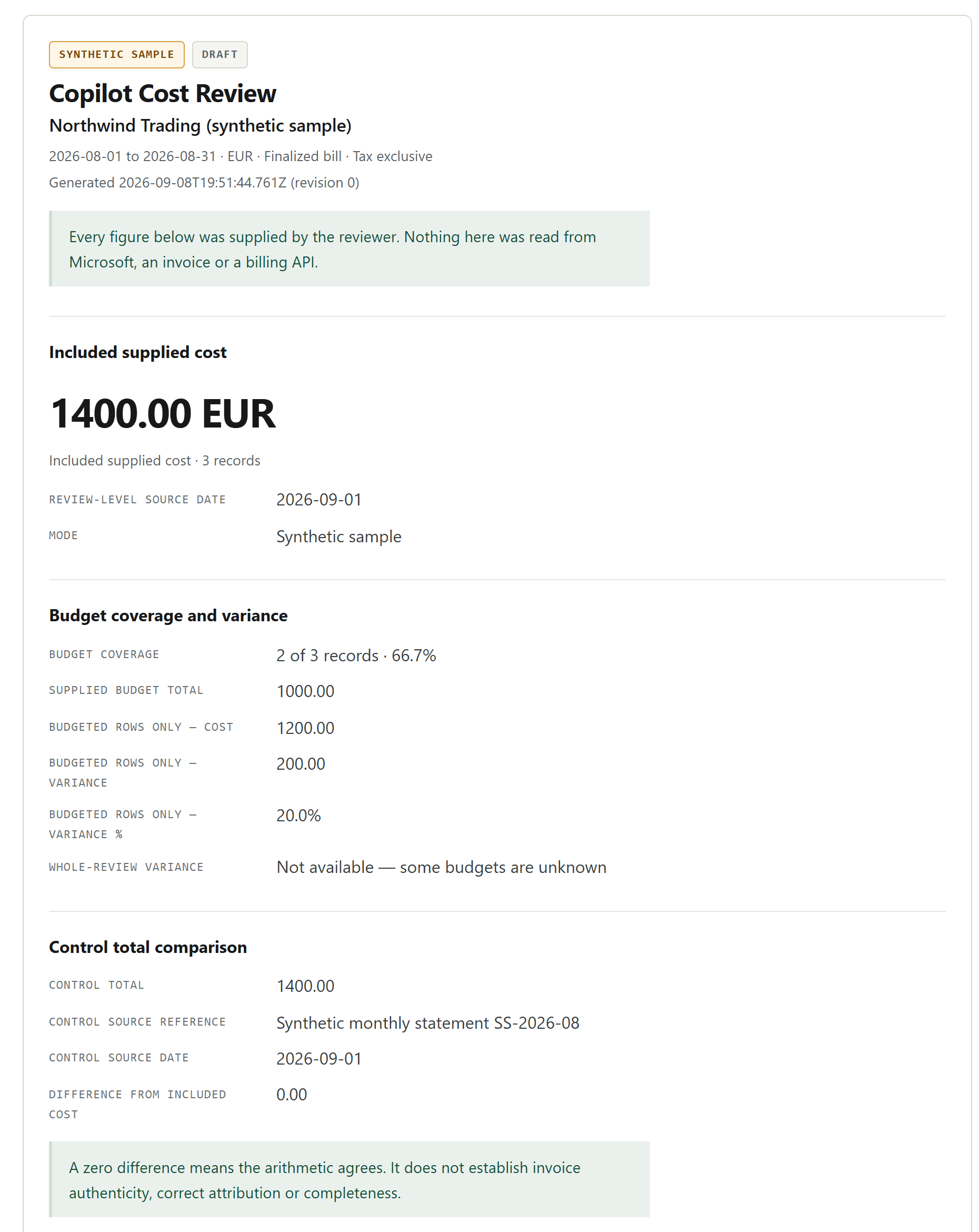
Open the full-size synthetic report screenshot (new tab) to read the smaller labels. The worked figures are also written in the table above.
Three things in that table matter more than the numbers.
The variance is scoped to the rows that have budgets, and says so. A report that quietly divides a full-review cost by a partial budget produces a variance that looks precise and means nothing. Here the comparison is explicitly "budgeted rows only", the coverage is printed next to it, and the whole-review variance is withheld entirely rather than guessed.
A matching control total is arithmetic agreement, not verified billing. €0.00 delta means your rows add up to the figure you also typed in. It does not mean the invoice is correct, the scopes are complete, or that Microsoft agrees. The report labels it exactly that way, and if you supply a control total without a source reference or date it adds a line saying it is incomplete control evidence rather than a verified bill total.
Copilot usage credits are not monetary adjustments. Usage credits go in a separate usage-context list — the sample carries one entry of 5,000 Copilot Credits — and they are listed individually. They are never converted to currency, never summed across contexts and never used to allocate cost. None of the monetary figures above move when you add or remove a credit entry. The supplied billing source, not a generic credit multiplier, owns the money figure; see the credits versus billed charges guide.
If a cost or budget is invalid — a stray currency symbol, three decimal places, a date that does not exist — the report does not generate at all. You get the field, the row and what is wrong with it. There is no partial total sitting there looking authoritative while one row silently failed to parse.
Step 4: record decisions and follow-ups
Every row carries a decision: Unreviewed, Accept as supplied, Investigate or Correction needed, plus a decision note, a follow-up owner and a due date.
The report separately lists the gaps it found across all rows: no supplied budget, no owner, no source reference, no source date, unreviewed decision, mixed or unconfirmed workload, negative adjustment, and actions missing a note, owner or due date. Each affected record's findings appear inside that record's own entry, so the reader can go from the summary count straight to the row.
To move the review from Draft to Reviewed you need a reviewer label, a reviewed-on date and a decision summary, and you need to have cleared the unreviewed decisions and incomplete actions. The reviewer label is deliberately a role or team, not a personal identity claim — the report states plainly that a completed review is the reviewer's own record, not an identity-verified approval or an audit sign-off.
One behaviour worth knowing before you present: a material edit invalidates the in-tab generated report and the completion. Change a cost, a budget, the period, the currency, the basis or a record, and the revision increments; the report must be regenerated and, if it was marked reviewed, marked again. Previously saved PDFs are not changed or revoked: save a replacement and check its timestamp and revision before sharing it.
Step 5: keep the output — CSV, JSON, PDF
Under 5. Keep the output there are four controls: Download CSV, Download review JSON, Download blank CSV template, and Print / Save as PDF. Files are written by your browser wherever you choose to save them. Nothing is uploaded, and closing the tab does not delete a file you already saved.
What each export preserves
| Output | Keeps | Does not keep | Use it for |
|---|---|---|---|
| CSV | All rows and record fields; the ten CSV context columns repeat on each row. Source dates are resolved per row. | Control total, usage credits, reviewer block, comparable-budget declaration and separate review-level source-date fallback | Spreadsheet work and sharing rows with finance; import starts a fresh Draft |
| Review JSON | Everything: context, all rows, control total and its source, usage credits, review status, reviewer, dates, decision summary, revision | Your session confirmations, which always reset on reopening | The complete, reopenable record — the one to archive |
| Blank template CSV | The 23 column headers in importer order | Any data | Collecting figures from someone else before the review |
| Print / Save as PDF | The complete report exactly as generated, every record and finding, no truncation | The editor panels, which are hidden in print | The artifact you actually hand to management or a client |
The JSON is the one to keep. Reopen it next month through 3. Open a local file and you get the whole review back — then use Start next review to carry forward only the organization, scope and owner labels while clearing every amount, budget, reference, date, decision, action and the sign-off. There is no projected cost and no automatic date carry-forward. You choose the new period, and you re-confirm the scope and budget declarations for the new figures.
The screen report and the printed report are built from the same validated snapshot, so what you present is what you reviewed.
Limits worth knowing before you promise a report
- No native Microsoft billing exports. For new cost rows, use the CertPilot CSV format; saved reviews reopen through its versioned JSON format. Excel workbooks, ZIP archives, PDFs and native Microsoft exports are not accepted. Getting figures out of the admin center or Azure and into the template is your step, and it is deliberate — a parser that guesses at a changing export format produces confident wrong totals.
- No currency conversion, and one currency per review.
- No allocation to individual people, no usage inspection, no scoring. Ownership is recorded at the role or team level.
- Validation is not billing verification. It validates inputs and checks arithmetic, not invoice authenticity, source completeness or whether your scopes are distinct.
- 1,000 records and 5 MiB per review.
Where CertPilot fits
Copilot Cost Review is a free, account-free tool that runs entirely in your browser tab. It has no analytics, no cookies and no network channel back to CertPilot; your figures are held in memory until you download a file or close the tab. Nothing you enter is saved to a CertPilot account, and signing up would not import it.
That is different from the rest of the platform. The Renewals & Vendor Register and the evidence reports are workspace-stored records with history — see the sample evidence reports for what those look like. This review is a local artifact you own the only copies of. For how CertPilot draws those boundaries generally, see the methodology.
If the harder question is who should be doing this every month, the Copilot spend ownership checklist covers the role split. If your renewal tracking is the weak part rather than the metered spend, start with the SaaS renewal tracking template instead — it owns a different job, and this review is not a replacement for it.
Frequently Asked Questions
Can I import a Microsoft billing export directly?
No. The tool accepts the CertPilot CSV format for this review only — not native Microsoft billing exports, Excel workbooks, ZIP files or PDFs. Download the blank template, move your figures into it, and import that. This is a deliberate v1 boundary rather than a missing feature.
What if I have no invoice or control total?
The control total is optional. Leave it empty and the report says "No control total was supplied" instead of inventing a comparison. If you do supply one without a source reference or date, the report flags it as incomplete control evidence.
What happens if only some of my rows have budgets?
You get a budget comparison scoped to the rows that have budgets, labelled as such, with the coverage printed beside it — in the worked example, 2 of 3 records and 66.7%. The whole-review variance is withheld, because with an unknown budget there is no honest whole-review figure to state.
Can I save a review and reopen it next month?
Yes. Download the review JSON and open it again through 3. Open a local file. Everything comes back except your two confirmations, which reset every session by design — a file cannot confirm on your behalf. Then use Start next review to keep the labels and clear the figures.
Does a matching control total mean the invoice is right?
No. It means the rows you entered add up to the figure you also entered. It is arithmetic agreement, and the report says exactly that. It proves nothing about invoice authenticity, scope completeness, whether your scopes overlap, or whether Microsoft would agree with the total.